
You’ve probably noticed your VR controllers drain faster than you’d like, leaving you scrambling for a charging solution that actually works. Finding the right dock isn’t just about convenience—it’s about protecting your equipment and maximizing your gaming sessions. Let’s explore which charging systems deliver the performance and durability you’re looking for.
| Meta Quest Compact Charging Dock for Quest 3/3S | 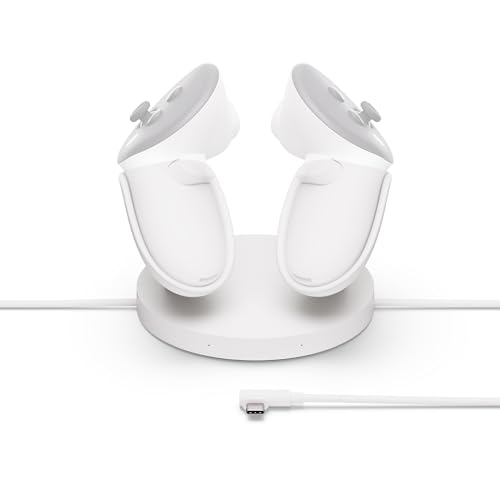 | Official Meta Pick | Charging Speed (Headset): Not specified | Controller Charging Capability: Drop-in charging for Touch Plus Controllers | Included Rechargeable Batteries: 2 lithium-ion batteries for Touch Plus Controllers | CHECK ON AMAZON | Read More |
| Kinwin Magnetic Charging Dock for Meta Quest 3S/3 |  | Best Value | Charging Speed (Headset): ~3 hours | Controller Charging Capability: Magnetic charging for 2 controllers (~4 hours) | Included Rechargeable Batteries: 2 rechargeable batteries | CHECK ON AMAZON | Read More |
| Foldable Charging Dock for Meta Quest 3/3S | 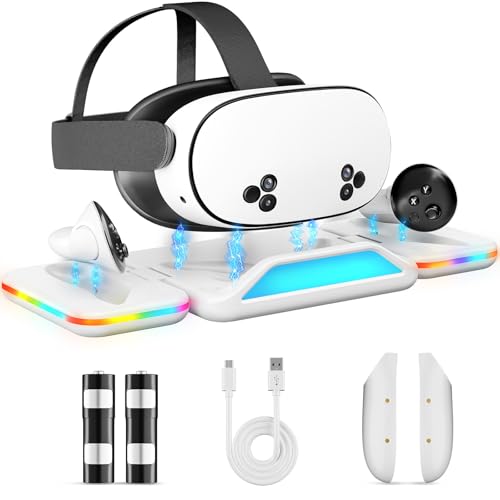 | Most Space-Saving | Charging Speed (Headset): 3 hours | Controller Charging Capability: Simultaneous charging for both controllers (~5 hours) | Included Rechargeable Batteries: Large-capacity rechargeable batteries (1000+ cycles) | CHECK ON AMAZON | Read More |
| Fast Charging Dock for Meta Oculus Quest Headsets |  | Most Compatible | Charging Speed (Headset): 2–3 hours | Controller Charging Capability: Headset only (no controllers) | Included Rechargeable Batteries: None | CHECK ON AMAZON | Read More |
| YOGES Charging Dock for Meta Quest 3 & 3S |  | Best Design | Charging Speed (Headset): 2–3 hours | Controller Charging Capability: Simultaneous charging for both controllers (~3 hours) | Included Rechargeable Batteries: 2 custom rechargeable batteries | CHECK ON AMAZON | Read More |
| Charging Dock for Meta Quest 2 VR Headset | 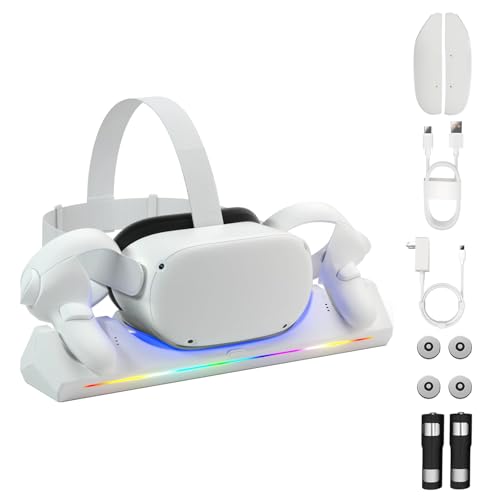 | Best For Quest 2 | Charging Speed (Headset): 4–5 hours | Controller Charging Capability: Simultaneous charging for headset and controllers (4–5 hours total) | Included Rechargeable Batteries: 2 custom 2100mAh rechargeable batteries | CHECK ON AMAZON | Read More |
| Charging Dock for Meta Oculus Quest 3/3S VR Headset |  | Premium All-In-One | Charging Speed (Headset): ~2.5 hours | Controller Charging Capability: Simultaneous charging for both controllers (~2 hours) | Included Rechargeable Batteries: 2×900mAh rechargeable batteries | CHECK ON AMAZON | Read More |
More Details on Our Top Picks
Meta Quest Compact Charging Dock for Quest 3/3S
If you’re a Meta Quest 3 or 3S owner who values convenience and seamless integration, the Meta Quest Compact Charging Dock deserves your attention. This premium accessory features drop-in charging for your Touch Plus Controllers, eliminating fumbling with cables. You’ll appreciate the extended headset charging cable that reaches further than standard options. Built-in overheating protection safeguards your devices during charging sessions. The dock comes equipped with two rechargeable lithium-ion batteries, ensuring your controllers stay powered. You can monitor controller battery levels directly within your headset, keeping you informed without hassle. Its compact design fits neatly in any space, and extensive testing ensures seamless compatibility with your Quest system.
- Charging Speed (Headset):Not specified
- Controller Charging Capability:Drop-in charging for Touch Plus Controllers
- Included Rechargeable Batteries:2 lithium-ion batteries for Touch Plus Controllers
- RGB Lighting:Not included
- Magnetic Charging Connection:Not specified
- Quest 3/3S Compatibility:Yes (Quest 3/3S)
- Additional Feature:Controller battery level monitoring
- Additional Feature:Extended headset charging cable
- Additional Feature:Premium Meta accessory design
Kinwin Magnetic Charging Dock for Meta Quest 3S/3
The Kinwin Magnetic Charging Dock stands out as the ideal choice for Meta Quest 3S/3 owners who want a streamlined charging solution that handles both their headset and controllers simultaneously. You’ll appreciate the magnetic USB-C interface that minimizes wear from repeated plugging. The dock charges your headset in approximately three hours and controllers in four hours. It includes two rechargeable batteries designed for over 1,000 reuses, reducing waste and battery replacement costs. RGB ambient lighting indicates charging status—orange for active charging, green for complete. Its compact, durable design keeps everything organized while the included accessories make setup effortless and straightforward.
- Charging Speed (Headset):~3 hours
- Controller Charging Capability:Magnetic charging for 2 controllers (~4 hours)
- Included Rechargeable Batteries:2 rechargeable batteries
- RGB Lighting:Yes (orange/green status indicators)
- Magnetic Charging Connection:Yes (magnetic USB-C interface)
- Quest 3/3S Compatibility:Yes (Quest 3S/3)
- Additional Feature:RGB status indicator lights
- Additional Feature:Eco-friendly 1000+ cycle batteries
- Additional Feature:Includes magnetic headset connectors
Foldable Charging Dock for Meta Quest 3/3S
Are you juggling multiple VR devices while hunting for outlet space? The Foldable Charging Dock solves this headache by charging your Meta Quest 3/3S headset and both controllers simultaneously in just three hours. It collapses to palm-size for storage, then expands into a sleek vertical display that saves 60% space. The magnetic connection snaps devices into perfect alignment in 0.3 seconds, reducing port wear by 90%. You’ll appreciate the customizable RGB lighting, smart safety chip preventing overcharging, and 24/7 expert support ensuring uninterrupted gaming sessions.
- Charging Speed (Headset):3 hours
- Controller Charging Capability:Simultaneous charging for both controllers (~5 hours)
- Included Rechargeable Batteries:Large-capacity rechargeable batteries (1000+ cycles)
- RGB Lighting:Yes (7-color ambient lighting)
- Magnetic Charging Connection:Yes (precision magnetic ports, 0.3-second alignment)
- Quest 3/3S Compatibility:Yes (Quest 3/3S)
- Additional Feature:Foldable palm-sized storage design
- Additional Feature:90% reduced port wear
- Additional Feature:24/7 expert customer support
Fast Charging Dock for Meta Oculus Quest Headsets
Looking to keep your Meta Quest headset charged without cluttering your gaming space? This fast charging dock delivers results in just 2–3 hours for Quest 3S, 3, or 2 models. You’ll appreciate its compatibility across Meta Quest, Rift, Pro, Pico, and HTC headsets. The dock features four non-slip pads that keep everything stable during charging, while built-in overcharge and over-current protection safeguard your device. Customizable RGB lighting with seven modes adds ambiance to your setup, and you can toggle it on or off based on your preference. Its high-strength ABS construction ensures durability for years of reliable use.
- Charging Speed (Headset):2–3 hours
- Controller Charging Capability:Headset only (no controllers)
- Included Rechargeable Batteries:None
- RGB Lighting:Yes (7 modes, controllable)
- Magnetic Charging Connection:Not mentioned
- Quest 3/3S Compatibility:Yes (Quest 3/3S, plus Quest 2 and other models)
- Additional Feature:Multi-brand universal compatibility
- Additional Feature:Seven RGB lighting modes
- Additional Feature:Non-slip rubber pad base
YOGES Charging Dock for Meta Quest 3 & 3S
Want a charging solution that keeps your Meta Quest 3 or 3S powered up without the clutter? The YOGES Charging Dock delivers rapid charging—your headset’s fully charged in 2–3 hours, controllers in roughly 3 hours. You’ll appreciate the built-in overcharge and short-circuit protection safeguarding your devices. The package includes two rechargeable batteries rated for over 1,000 cycles, controller covers, and a USB-C cable. Its stable stand accommodates any battery strap, including elite options. Beyond functionality, the sleek design elegantly organizes your VR gear while reducing desk clutter, making it a thoughtful gift for Quest enthusiasts. Plus, you’re backed by 24/7 customer support.
- Charging Speed (Headset):2–3 hours
- Controller Charging Capability:Simultaneous charging for both controllers (~3 hours)
- Included Rechargeable Batteries:2 custom rechargeable batteries
- RGB Lighting:Not specified
- Magnetic Charging Connection:Not specified
- Quest 3/3S Compatibility:Yes (Quest 3/3S only, not Quest 2)
- Additional Feature:Accommodates elite battery straps
- Additional Feature:Stylish elegant dock design
- Additional Feature:24/7 customer support included
Charging Dock for Meta Quest 2 VR Headset
If you’re a Meta Quest 2 owner tired of hunting for batteries and tangled cables, ArocoVr’s Charging Dock offers the seamless solution you’ve been waiting for. This magnetic charging station simultaneously powers your headset and controllers in just 4-5 hours, featuring intuitive LED indicators that signal charging status and completion. You’ll appreciate the included 2100mAh rechargeable batteries, each lasting over 1000 uses, making this an eco-friendly alternative to disposable batteries. Beyond functionality, the dock declutters your gaming space by organizing your equipment and cables neatly. With its complete kit, #1 ranking in VR accessories, and stellar 5-star reviews, you’re getting reliable performance backed by user satisfaction.
- Charging Speed (Headset):4–5 hours
- Controller Charging Capability:Simultaneous charging for headset and controllers (4–5 hours total)
- Included Rechargeable Batteries:2 custom 2100mAh rechargeable batteries
- RGB Lighting:Not specified
- Magnetic Charging Connection:Yes (magnetic USB-C connectors)
- Quest 3/3S Compatibility:No (Quest 2 only)
- Additional Feature:LED blue/green status indicators
- Additional Feature:Adjustable sleep mode feature
- Additional Feature:Amazon #1 bestseller ranking
Charging Dock for Meta Oculus Quest 3/3S VR Headset
The DOBE FOMIS ELECTRONICS charging dock stands out as the ultimate solution for Meta Quest 3/3S owners who want everything in one place. You’ll charge your headset and controllers simultaneously using magnetic connectors that reduce port wear. The included 15W adapter delivers fast charging—your headset’s ready in 2.5 hours, controllers in 2 hours. You get two 900mAh rechargeable batteries with 2000+ charging cycles each, eliminating disposable battery waste. The RGB display features nine color modes with sleep-friendly lighting controlled by a one-touch switch. An extra USB port lets you charge your phone or power bank simultaneously. It’s compatible with all Quest 3/3S headstraps and includes both magnetic and standard USB-C options.
- Charging Speed (Headset):~2.5 hours
- Controller Charging Capability:Simultaneous charging for both controllers (~2 hours)
- Included Rechargeable Batteries:2×900mAh rechargeable batteries
- RGB Lighting:Yes (9 color modes)
- Magnetic Charging Connection:Yes (built-in magnetic USB-C connector and pogo pins)
- Quest 3/3S Compatibility:Yes (Quest 3/3S)
- Additional Feature:Nine color mode RGB display
- Additional Feature:Additional USB port included
- Additional Feature:2000+ battery cycle lifespan
Factors to Consider When Choosing VR Controller Charging Docks
When you’re shopping for a VR controller charging dock, you’ll want to verify it’s compatible with your specific headset model and check whether it charges your controllers faster than standard methods. You should also consider whether the dock can charge multiple devices simultaneously, how it impacts your controllers’ battery longevity over time, and whether you prefer the convenience of magnetic connections or the reliability of plug-in options.
Compatibility With Your Headset
Choosing the right charging dock starts with confirming it’ll actually work with your headset model. You’ll want to verify explicit compatibility listings—whether your dock supports Quest 3/3S, Quest 2, or another model entirely. Check that it accommodates all your accessories, including Touch Plus controllers or elite straps.
Next, examine the charging connectors. Your dock must match your headset’s interface, whether that’s magnetic USB-C or pogo pins. Mismatched connectors mean your headset won’t charge properly, defeating the dock’s purpose.
Finally, confirm whether the dock charges both your headset and controllers simultaneously. Some docks only handle controllers, while others support full-system charging. Look for model-specific notes that flag incompatibilities or required adapters, preventing costly purchasing mistakes.
Charging Speed And Performance
Once you’ve confirmed compatibility, you’ll want to evaluate how quickly your dock actually charges. Charging speeds vary significantly—headsets typically need 2–3 hours for a full charge, while controllers require 2–5 hours depending on the model and dock design.
Look for docks featuring smart power distribution, which can simultaneously charge your headset and controllers more efficiently than standard setups. Magnetic charging docks offer another advantage: precise alignment ensures optimal efficiency compared to traditional plug-in options.
Don’t overlook the power adapter specs. Many quality docks require a specific wattage—typically 18W—to deliver advertised fast-charging performance. Underpowered adapters will significantly slow charging times.
Finally, prioritize docks with robust heat management and safety protections against overcharging and overheating, which maintain consistent charging speeds throughout extended sessions.
Simultaneous Multi-Device Charging
Since you’ll want to minimize downtime between gaming sessions, simultaneous multi-device charging is a game-changer. Look for docks that charge your headset and both controllers at once, significantly reducing total charging cycles. You’ll appreciate independent charging indicators for each device, allowing you to monitor progress without unplugging anything.
Magnetic charging or pogo-pin connectors ensure proper alignment and minimize wear during simultaneous charging. Most quality docks deliver headset full charges in 2–3 hours and controllers in 2–5 hours, depending on power distribution.
Verify the dock includes robust safety protections: overcharge, overcurrent, and overheating safeguards. These features protect all connected devices simultaneously, ensuring your expensive VR equipment stays protected while charging efficiently overnight or between play sessions.
Battery Longevity And Cycles
Beyond protecting your devices during each charging session, you’ll want to contemplate how many times you can actually recharge before battery performance degrades. Most quality docks advertise 1000+ recharge cycles for their internal cells, meaning you won’t constantly replace batteries. When you invest in a dock with replaceable or rechargeable batteries, you’re extending your entire setup’s lifespan considerably. Designs emphasizing long cycle life directly reduce waste and lower your ongoing replacement costs for headsets and controllers. By choosing a dock that maximizes battery longevity, you’re making a smart financial decision that keeps your VR equipment functional for years while minimizing environmental impact.
Magnetic Versus Plug-In Connections
How do you want your controllers to charge—with a satisfying snap or a careful insertion? Magnetic docks offer automatic alignment and snap-in convenience, eliminating the frustration of precise port positioning. They’re gentler on your hardware too, since magnetic connectors avoid repeated insertion wear that traditional plug-in systems endure.
With magnetic docks, you’ll experience faster docking within seconds and a forgiving design that handles misalignment effortlessly. Even cable tugs won’t destabilize the connection. USB-C magnetic interfaces specifically minimize port degradation through avoided plug wear.
Plug-in docks demand your attention to pin alignment and careful fitting, risking connection issues over time. If you prioritize durability, convenience, and longevity, magnetic connections deliver superior performance and user experience for your VR controllers.
Safety Features And Protections
What separates a reliable charging dock from a risky one? Safety features and protections. You’ll want overcharge protection that stops charging once your battery reaches full capacity, safeguarding both the battery and dock from damage. Over-current and short-circuit protection shield your headset and controllers from electrical faults during charging sessions.
Temperature control is crucial—you need smart heat-dissipation systems keeping charging temperatures below safe thresholds, typically under 45°C, to prevent overheating. Magnetic charging connectors and pogo pins reduce port wear from repeated use, extending your dock’s lifespan.
Finally, consider sleep modes and automatic shutoff features that halt charging when devices are fully charged or idle, preventing unnecessary power draw and potential hazards.
Space And Storage Design
Your play space shouldn’t disappear under charging equipment. Smart dock designs collapse or tuck away when you’re not actively charging, keeping your VR area clutter-free. Some models expand vertically to showcase your headset and controllers together, while others fold into palm-sized footprints that slip into storage easily.
You’ll appreciate integrated cable management that conceals wires within the base, maintaining that minimalist aesthetic you’re after. Multi-device docks prove especially valuable here—they charge your headset and both controllers simultaneously without consuming extra floor real estate.
RGB ambient lighting might seem decorative, but it strategically draws your eye toward the dock rather than exposed cables, making your setup appear more organized and intentional. This visual trick effectively maximizes your perceived play space without requiring physical reorganization.
RGB Lighting And Indicators
Why settle for a charging dock that’s purely functional when it can communicate charging status through intelligent lighting? RGB indicators do more than look impressive—they convey essential information at a glance. Blue pulsating lights signal active charging, while steady blue confirms your controllers are fully charged. Premium docks offer full 7-color spectrum customization, letting you personalize your setup or disable lighting entirely if you prefer minimal distractions during gameplay. Sleep-friendly lighting options reduce eye strain during extended sessions, while memory-preserving settings minimize visual fatigue. These indicators work alongside magnetic alignment systems, confirming proper docking and charging progress instantly. You’ll appreciate how thoughtful lighting design transforms your dock from a simple accessory into an intuitive status hub that enhances your VR experience.
Frequently Asked Questions
Can VR Controller Charging Docks Work With Multiple Headset Models Simultaneously?
You can use most universal VR controller charging docks with multiple headset models simultaneously. However, you’ll need to verify compatibility with your specific controllers, as some docks are proprietary and won’t work across different brands.
How Long Do VR Controller Batteries Typically Last After Full Charge?
You’ll typically get 4-8 hours of gameplay from a fully charged VR controller battery, depending on your headset model and usage intensity. High-end controllers often last longer than budget options, so you’ll want to check your device’s specifications.
Are Wireless Charging Docks Safer Than Wired Options for Controllers?
You’ll find wireless charging docks safer for your controllers since they eliminate exposed metal contacts and electrical hazards. They’re also more convenient, though wired options charge faster and work reliably with all controller types.
What Warranty Coverage Do Most VR Controller Charging Docks Provide?
You’ll typically find one to two-year warranties covering most VR controller charging docks. They’re protecting you against defects, malfunctions, and hardware failures. Some premium models offer extended coverage, though you shouldn’t expect accidental damage protection included.
Can I Use Third-Party Charging Docks Without Voiding My Headset Warranty?
You can typically use third-party charging docks without voiding your headset warranty, though you’ll want to verify your manufacturer’s specific policy. Most companies don’t restrict aftermarket accessories, but checking your warranty documentation ensures you’re protected.




Leave a Reply