
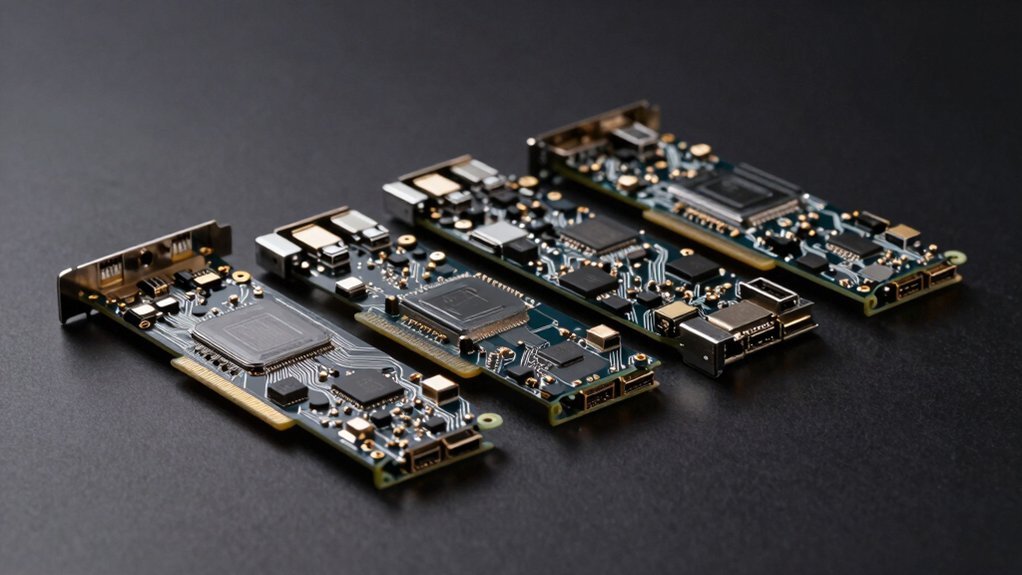
You’re probably running out of USB ports on your desktop or workstation. Whether you’re managing external drives, cameras, or peripherals, a quality PCIe expansion card can solve this problem efficiently. But which one’s right for your setup? The options vary greatly in port count, speed, and power delivery. We’ll break down the top contenders to help you find the perfect fit.
| ELUTENG PCIe USB 3.2 Expansion Card (8 Ports) |  | Premium Performance Leader | Total USB Ports: 8 ports (6 Type-A + 2 Type-C) | Maximum Data Transfer Speed: 10 Gbps (USB 3.2 Gen2) | External Power Supply Required: No | CHECK ON AMAZON | Read Our Analysis |
| ELUTENG PCIe USB 3.0 Expansion Card 7 Ports |  | Best Value Choice | Total USB Ports: 7 ports (all Type-A) | Maximum Data Transfer Speed: 5 Gbps (USB 3.0) | External Power Supply Required: No | CHECK ON AMAZON | Read Our Analysis |
| PCIE USB 3.0 Expansion Card 7 Ports | 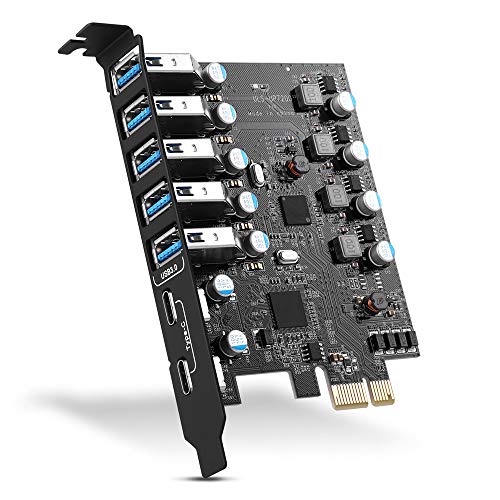 | Mac Compatible Option | Total USB Ports: 7 ports (5 Type-A + 2 Type-C) | Maximum Data Transfer Speed: 5 Gbps (USB 3.0) | External Power Supply Required: No | CHECK ON AMAZON | Read Our Analysis |
| PCIe to USB 3.2 Expansion Card (7 Ports) |  | Fastest Speed Available | Total USB Ports: 7 ports (4 Type-A + 3 Type-C) | Maximum Data Transfer Speed: 10 Gbps (USB 3.2 Gen2) | External Power Supply Required: No | CHECK ON AMAZON | Read Our Analysis |
| Sinefine PCIe USB 3.0 Expansion Card (7 Ports) |  | Balanced Performance Pick | Total USB Ports: 7 ports (4 Type-A + 3 Type-C) | Maximum Data Transfer Speed: 5 Gbps (USB 3.0) | External Power Supply Required: No | CHECK ON AMAZON | Read Our Analysis |
| GLOTRENDS U6A2C 8-Port USB 3.0 PCIe Expansion Card |  | Budget-Friendly Pick | Total USB Ports: 8 ports (6 Type-A + 2 Type-C) | Maximum Data Transfer Speed: 5 Gbps (USB 3.0) | External Power Supply Required: No | CHECK ON AMAZON | Read Our Analysis |
| Sinefine 4 Port PCI-E USB 3.0 Expansion Card | 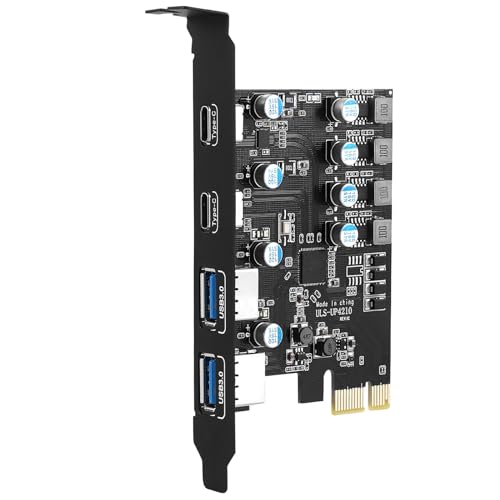 | Most Versatile Card | Total USB Ports: 4 ports (2 Type-A + 2 Type-C) | Maximum Data Transfer Speed: 5 Gbps (USB 3.0) | External Power Supply Required: No | CHECK ON AMAZON | Read Our Analysis |
| GLOTRENDS U3044 USB 3.0 PCIe Expansion Card |  | Industrial-Grade Reliability | Total USB Ports: 4 ports (all Type-A) | Maximum Data Transfer Speed: 5 Gbps (USB 3.0) | External Power Supply Required: No | CHECK ON AMAZON | Read Our Analysis |
| 7-Port USB 3.0 PCIe Expansion Card for Desktop |  | Most User-Friendly | Total USB Ports: 7 ports (all Type-A) | Maximum Data Transfer Speed: 5 Gbps (USB 3.0) | External Power Supply Required: No | CHECK ON AMAZON | Read Our Analysis |
| 4 Port USB 3.0 PCI Express Expansion Card (FS-U4-Pro) |  | Best For Workstations | Total USB Ports: 4 ports (all Type-A) | Maximum Data Transfer Speed: 5 Gbps (USB 3.0) | External Power Supply Required: No | CHECK ON AMAZON | Read Our Analysis |
More Details on Our Top Picks
ELUTENG PCIe USB 3.2 Expansion Card (8 Ports)
Are you tired of constantly swapping USB devices because you don’t have enough ports? The ELUTENG PCIe USB 3.2 Expansion Card solves this problem with eight simultaneous connections—six Type-A and two Type-C ports. You’ll enjoy lightning-fast 10 Gbps speeds while two devices operate independently without interference. The card requires no external power, relying instead on independent capacitors per port for stable, fault-protected delivery. Its NEC720210 and NEC720201 chipsets ensure reliability, while solid-state components withstand extreme temperatures. Advanced alloy materials keep everything cool at room temperature, guaranteeing consistent performance whether you’re transferring data or powering peripherals.
- Total USB Ports:8 ports (6 Type-A + 2 Type-C)
- Maximum Data Transfer Speed:10 Gbps (USB 3.2 Gen2)
- External Power Supply Required:No
- Windows OS Compatibility:Windows 11/10/8/7/XP/Vista
- PCIe Slot Compatibility:PCIe x1, x4, x8, x16
- Mac OS Support:Not specified
- Additional Feature:USB 3.2 Gen2 10 Gbps
- Additional Feature:Type-A and Type-C ports
- Additional Feature:Independent dual interface operation
ELUTENG PCIe USB 3.0 Expansion Card 7 Ports
Need to add seven USB 3.0 ports to your PC without cluttering your desk with external hubs? This ELUTENG card delivers exactly that. It fits any PCI-E slot (X1, X4, X8, X16) and supplies up to 5V/2A per port without requiring external power. You’ll get true 5Gbps speeds—ten times faster than USB 2.0—making file transfers and HD media access genuinely quick. The card uses quality NEC chips and solid capacitors for reliability. Windows 8 and newer users skip driver installation entirely; older Windows versions need the included CD driver. It’s backward compatible with USB 2.0 devices and supports both 32-bit and 64-bit systems, though Mac users should look elsewhere.
- Total USB Ports:7 ports (all Type-A)
- Maximum Data Transfer Speed:5 Gbps (USB 3.0)
- External Power Supply Required:No
- Windows OS Compatibility:Windows 11/10/8/7/XP/Vista
- PCIe Slot Compatibility:PCIe x1, x4, x8, x16
- Mac OS Support:No
- Additional Feature:NEC720201 & NEC720210 chipset
- Additional Feature:2-phase independent power supply
- Additional Feature:7 solid capacitors per port
PCIE USB 3.0 Expansion Card 7 Ports
If you’re running out of USB ports on your desktop, this PCIe USB 3.0 expansion card offers an immediate solution with seven additional ports—five Type-A and two Type-C—that’ll accommodate everything from external hard drives and printers to gaming controllers and VR headsets. The card delivers transfer rates up to 5Gbps and supports Windows XP through Windows 11 plus Mac OS and Linux. Installation’s straightforward: you’ll insert it into any PCIe slot (x1, x4, x8, or x16) and enjoy backward compatibility with older USB devices. Most systems won’t need drivers, though Windows XP and Vista require driver installation. You’ll get a two-year warranty and round-the-clock support.
- Total USB Ports:7 ports (5 Type-A + 2 Type-C)
- Maximum Data Transfer Speed:5 Gbps (USB 3.0)
- External Power Supply Required:No
- Windows OS Compatibility:Windows 11/10/8/7/XP
- PCIe Slot Compatibility:PCIe x1, x4, x8, x16
- Mac OS Support:Yes (10.8.2+)
- Additional Feature:5 Type-A, 2 Type-C
- Additional Feature:2-year product care warranty
- Additional Feature:24/7 customer support included
PCIe to USB 3.2 Expansion Card (7 Ports)
Desktop users who’ve exhausted their motherboard’s USB ports will find this PCIe to USB 3.2 Gen 2 expansion card indispensable. You’ll gain 7 external ports—4 USB Type-A and 3 USB Type-C—delivering up to 20 Gbps total bandwidth. The card splits performance across two 10 Gbps channels, so you’ll achieve maximum speed when using one port solely. Installation’s straightforward: insert the card into your PCIe slot, secure it with mounting screws, then install drivers if needed. You won’t need external power for typical devices like HDDs or SSDs. This internal connection ensures stable, reliable performance superior to external hubs, backed by 24/7 technical support and one-year coverage.
- Total USB Ports:7 ports (4 Type-A + 3 Type-C)
- Maximum Data Transfer Speed:10 Gbps (USB 3.2 Gen2)
- External Power Supply Required:No
- Windows OS Compatibility:Windows 11/10/8/7
- PCIe Slot Compatibility:PCIe x1, x4, x8, x16
- Mac OS Support:Yes (10.8.2+)
- Additional Feature:20 Gbps total bandwidth
- Additional Feature:4 Type-A, 3 Type-C
- Additional Feature:Dual 10 Gbps port groups
Sinefine PCIe USB 3.0 Expansion Card (7 Ports)
Are you struggling to connect multiple USB devices to your PC without sacrificing speed? The Sinefine PCIe USB 3.0 Expansion Card delivers seven ports—four Type-A and three Type-C—giving you instant connectivity. You’ll get dual 5Gbps bandwidth channels, allowing simultaneous data transfers at speeds up to 5Gbps per port. Type-C ports supply up to 15W power each, while Type-A ports provide 5W, powering hungry peripherals effortlessly. Installation’s straightforward; just plug it into your PCIe slot. Short-circuit protection safeguards your devices. Windows 10/11 and Linux need no drivers, while older systems rely on included software. You’re backed by a 240-day warranty and responsive customer support.
- Total USB Ports:7 ports (4 Type-A + 3 Type-C)
- Maximum Data Transfer Speed:5 Gbps (USB 3.0)
- External Power Supply Required:No
- Windows OS Compatibility:Windows 11/10/8/7
- PCIe Slot Compatibility:PCIe x1
- Mac OS Support:Not specified
- Additional Feature:4 Type-A, 3 Type-C ports
- Additional Feature:15W USB Type-C power
- Additional Feature:240-day worry-free warranty
GLOTRENDS U6A2C 8-Port USB 3.0 PCIe Expansion Card
You’ll find the GLOTRENDS U6A2C ideal if you’re running Windows or Linux and need straightforward USB expansion without fussing over external power supplies. This 8-port card delivers two Type-C and six Type-A connections through a single PCIe x1 slot, sharing 5 Gbps bandwidth across all ports. The self-powered design handles up to eight 5V/1A devices simultaneously or three high-power 5V/2A devices. Its NEC720201 chipset and ceramic capacitors ensure stable transmission. The regular-profile bracket fits standard cases but won’t work in slim builds. Installation’s plug-and-play on Windows 11, 10, and 8, plus most Linux kernels—no drivers needed. It’s perfect for industrial cameras, VR systems, and USB 3.0 NVMe enclosures, though Mac users should look elsewhere.
- Total USB Ports:8 ports (6 Type-A + 2 Type-C)
- Maximum Data Transfer Speed:5 Gbps (USB 3.0)
- External Power Supply Required:No
- Windows OS Compatibility:Windows 11/10/8
- PCIe Slot Compatibility:PCIe x1
- Mac OS Support:No
- Additional Feature:6 Type-A, 2 Type-C
- Additional Feature:3-group power management system
- Additional Feature:NEC720201 & NEC720210 chipset
Sinefine 4 Port PCI-E USB 3.0 Expansion Card
If you’re looking to add multiple USB ports to your PC without cluttering your case with external hubs, the Sinefine 4 Port PCI-E USB 3.0 Expansion Card offers an internal solution that requires no additional power adapters. You’ll get four ports—two USB-A and two USB-C—connected via a single PCIe 1X slot. The card supports up to 5 Gbps data rates and works across PCIe 4.0, 3.0, 2.0, and 1.0 motherboards. Built-in protections safeguard your connected devices, and installation’s straightforward with included screws and manual. Windows 11, 10, 8, and Linux need no drivers; Windows 7 requires the provided CD. It’s ideal for expanding storage and peripheral connectivity affordably.
- Total USB Ports:4 ports (2 Type-A + 2 Type-C)
- Maximum Data Transfer Speed:5 Gbps (USB 3.0)
- External Power Supply Required:No
- Windows OS Compatibility:Windows 11/10/8/7
- PCIe Slot Compatibility:PCIe x1
- Mac OS Support:Not specified
- Additional Feature:2 Type-A, 2 Type-C
- Additional Feature:360-day worry-free warranty
- Additional Feature:4x voltage-stable capacitance design
GLOTRENDS U3044 USB 3.0 PCIe Expansion Card
The GLOTRENDS U3044 delivers what industrial and professional users need: four independent USB 3.0 ports that’ll simultaneously power demanding devices like industrial cameras, VR systems, and USB 3.0 NVMe enclosures without requiring additional power cables. You’ll get dual-layer protection with independent power management per channel, ensuring reliability under heavy workloads. Its NEC720201 chipset handles 5Gbps bandwidth across all ports, while the self-powered design provides up to 40W total output. Installation’s straightforward on Windows 11, 10, 8, Linux, and modern servers. Just note it won’t fit slim cases and isn’t Mac-compatible.
- Total USB Ports:4 ports (all Type-A)
- Maximum Data Transfer Speed:5 Gbps (USB 3.0)
- External Power Supply Required:No
- Windows OS Compatibility:Windows 11/10/8
- PCIe Slot Compatibility:PCIe x1
- Mac OS Support:No
- Additional Feature:4 USB Type-A only
- Additional Feature:Dual-layer protection design
- Additional Feature:40W total power output
7-Port USB 3.0 PCIe Expansion Card for Desktop
Running out of USB ports on your desktop shouldn’t mean sacrificing connectivity—that’s where a 7-port USB 3.0 PCIe expansion card becomes indispensable. You’ll instantly gain seven high-speed ports supporting 5Gbps SuperSpeed transfers, perfect for external drives, peripherals, and HD video work. The card features UASP technology and four dedicated channels that reduce CPU load by up to 20%, enhancing multitasking performance. Its aluminum heatsink prevents overheating during extended use, while over-current protection ensures reliability. Installation’s straightforward—it’s plug-and-play with driver-free support across Windows and Linux systems. Whether you’re gaming, managing workstations, or handling servers, this expansion card efficiently solves port limitations without complicated setup.
- Total USB Ports:7 ports (all Type-A)
- Maximum Data Transfer Speed:5 Gbps (USB 3.0)
- External Power Supply Required:No
- Windows OS Compatibility:Windows 11/10/8/7/XP/Vista
- PCIe Slot Compatibility:PCIe x1, x4, x8, x16
- Mac OS Support:Not specified
- Additional Feature:UASP technology support
- Additional Feature:4 dedicated channels
- Additional Feature:Aluminum heatsink included
4 Port USB 3.0 PCI Express Expansion Card (FS-U4-Pro)
Need additional USB 3.0 connectivity without cluttering your desk with external hubs? The FS-U4-Pro delivers four 5Gbps USB 3.0 ports through your PCIe X1 slot with zero extra power cables needed. Its self-powered design provides 5V/2A per port, supporting demanding devices like industrial cameras, VR systems, and NVMe enclosures alongside standard peripherals. You’ll get plug-and-play installation on Windows 10, 11, and most Linux systems. Built-in electronic fuses and voltage-stable components protect your equipment. Just confirm your desktop has an available PCIe slot—this full-height card won’t fit slim cases. The shared 5Gbps bandwidth works well for most applications.
- Total USB Ports:4 ports (all Type-A)
- Maximum Data Transfer Speed:5 Gbps (USB 3.0)
- External Power Supply Required:No
- Windows OS Compatibility:Windows 11/10/8/7/XP/Vista
- PCIe Slot Compatibility:PCIe x1, x4, x8, x16
- Mac OS Support:No
- Additional Feature:RENESAS UPD720201 controller chip
- Additional Feature:4 electronic fuses protection
- Additional Feature:FebSmart self-powered technology
Factors to Consider When Choosing PCIe USB Expansion Cards
When you’re selecting a PCIe USB expansion card, you’ll need to evaluate several critical factors that directly impact your system’s performance and usability. You should consider port count and type, speed and bandwidth capabilities, power supply requirements, operating system compatibility, and the card’s installation process and form factor to ensure it meets your specific needs. Each of these elements plays a vital role in determining whether a particular expansion card will work effectively in your setup.
Port Count and Type
The right balance of USB ports can make or break your expansion card’s usefulness. You’ll find cards ranging from 4 to 8 ports, each offering different expansion capacity for your peripherals.
Most cards combine USB Type-A and Type-C ports, letting you connect legacy and modern devices without adapters. However, you’ll need to consider bandwidth limitations. Many cards share total bandwidth—typically 5 Gbps or 10 Gbps—across all ports, meaning simultaneous device usage reduces individual port speeds.
Before purchasing, verify your motherboard’s available PCIe slots and their specifications. Additionally, check whether the card requires external power for high-demand devices or offers independent per-port power delivery. This ensures you’ll get genuine multi-device support without performance bottlenecks.
Speed and Bandwidth
How much bandwidth do you actually need from your USB expansion card? That depends on your devices and usage patterns.
Most USB expansion cards share total bandwidth across ports rather than providing full speed to each one. A typical USB 3.0 card delivers 5 Gbps total across eight ports, meaning you’ll split that bandwidth when using multiple devices simultaneously. Some higher-end cards partition ports into independent groups—say two 5 Gbps groups—to prevent interference and stabilize power delivery.
Individual ports can theoretically reach 5 Gbps (USB 3.0) or 10 Gbps (USB 3.2 Gen 2), but only when used exclusively. Real-world throughput also depends on your devices’ capabilities and driver availability. Consider your actual workload: transferring files occasionally requires less bandwidth than running several external drives simultaneously.
Power Supply Requirements
While bandwidth determines how fast your data moves, power delivery ensures your devices actually function reliably on the expansion card. Most self-powered PCIe USB expansion cards require no external power supply for standard operation, but you’ll want to verify per-port limits before connecting high-power devices. Many cards specify individual power ceilings—typically 5V/2A for USB-A ports and 5V/3A for USB-C ports—to prevent overload conditions. Some models employ independent multi-phase power supplies that reduce cross-port interference and improve stability. However, certain designs share PCIe bus power across multiple ports, which can limit simultaneous high-power usage. Check whether your card supports advanced charging standards like USB Power Delivery or BC 1.2, as many expansion cards don’t. These details matter when you’re powering demanding peripherals.
Operating System Compatibility
Before you install a PCIe USB expansion card, you’ll need to verify that your operating system actually supports it. Modern Windows versions like 11, 10, and 8 often recognize these cards without requiring drivers, offering true plug-and-play functionality. However, if you’re running older systems like Windows XP, Vista, or 7, you’ll likely need to install drivers from a CD or download them online.
Linux compatibility is generally strong across most models, but macOS support remains inconsistent and frequently unavailable. Additionally, driver requirements can vary depending on your PCIe slot type—x1, x4, x8, or x16—which may also affect performance. Always check the manufacturer’s specifications for explicit compatibility listings with your specific OS version and bit architecture before purchasing.
Installation and Form Factor
Once you’ve confirmed your operating system supports a PCIe USB expansion card, you’ll need to evaluate the physical and technical aspects of installation. Start by identifying available PCIe slots on your motherboard—you’ll find x1, x4, x8, or x16 options, each supporting different card types. Consider your case’s form factor: full-height brackets fit standard enclosures, but slim or compact cases may reject them entirely. Verify your power supply can handle the card’s requirements, especially if it draws independent power per port rather than relying solely on PCIe slot power. Finally, check the PCIe slot orientation and any nearby components that might obstruct installation. Taking these factors into account ensures your expansion card integrates seamlessly into your system.
Frequently Asked Questions
Do PCIE USB Expansion Cards Work With Mac Computers and Laptops?
You’ll find that PCIe USB expansion cards work with Mac computers, but you’re limited to Mac models with PCIe slots. Most modern MacBooks don’t have these slots, so you’ll need a desktop Mac or external PCIe enclosure.
What’s the Difference Between USB 3.0 and USB 3.2 Expansion Cards?
You’ll find USB 3.2 expansion cards offer markedly faster speeds—up to 20 Gbps versus USB 3.0’s 5 Gbps. You’ll also get better power delivery and improved compatibility with newer devices when you choose USB 3.2.
Can I Use Multiple PCIE USB Expansion Cards in One Computer Simultaneously?
Yes, you can install multiple PCIe USB expansion cards in your computer simultaneously. You’ll need available PCIe slots and sufficient power supply capacity. Each card’ll function independently, giving you additional USB ports for your devices.
Will PCIE USB Expansion Cards Work With Older Motherboards and BIOS Versions?
You’ll find most PCIe USB expansion cards work with older motherboards, but you’ll need BIOS support for the card’s features. You should check your motherboard’s compatibility and update your BIOS if necessary before installing.
How Much Power Do PCIE USB Expansion Cards Consume From the Power Supply?
You’ll find that most PCIe USB expansion cards draw minimal power, typically under 5 watts. They’re primarily powered through the PCIe slot itself, so you won’t need additional power connectors for standard models.




Leave a Reply