
You’re probably wondering if your current router can handle immersive VR without lag or disconnections. The truth is, most older models won’t cut it for 2026’s demanding streaming requirements. We’ve tested fourteen WiFi 6 and 6E routers that deliver the low-latency, multi-device capacity you need. The real question is: which one fits your setup and budget?
| TP-Link AXE5400 WiFi 6E Router (Archer AXE75) |  | Best Overall | WiFi Standard: WiFi 6E (Tri-Band) | Maximum WiFi Speed: 5400 Mbps | Coverage Area: Not specified | CHECK ON AMAZON | Read Our Analysis |
| TP-Link AX1800 WiFi 6 Router (Archer AX21) |  | Best Budget Pick | WiFi Standard: WiFi 6 (Dual-Band) | Maximum WiFi Speed: 1800 Mbps | Coverage Area: Not specified | CHECK ON AMAZON | Read Our Analysis |
| TP-Link AX5400 WiFi 6 Router (Archer AX73) |  | Best Mid-Range | WiFi Standard: WiFi 6 (Dual-Band) | Maximum WiFi Speed: 5400 Mbps | Coverage Area: Not specified | CHECK ON AMAZON | Read Our Analysis |
| NETGEAR 4-Stream WiFi 6 Router (R6700AX) |  | Best Alternative | WiFi Standard: WiFi 6 (Dual-Band) | Maximum WiFi Speed: 1800 Mbps | Coverage Area: 1500 sq. ft. | CHECK ON AMAZON | Read Our Analysis |
| TP-Link AC1200 Gigabit WiFi Router (Archer A6) |  | Most Affordable | WiFi Standard: WiFi 5 AC (Dual-Band) | Maximum WiFi Speed: 1200 Mbps | Coverage Area: Not specified | CHECK ON AMAZON | Read Our Analysis |
| Davolink Minions WiFi 6E Gaming Router Mesh System |  | Best Mesh System | WiFi Standard: WiFi 6 (Dual-Band) | Maximum WiFi Speed: 1770 Mbps | Coverage Area: Large homes/offices | CHECK ON AMAZON | Read Our Analysis |
| TP-Link Archer AX55 Dual-Band Wi-Fi 6 Router |  | Best Value | WiFi Standard: WiFi 6 (Dual-Band) | Maximum WiFi Speed: 2976 Mbps | Coverage Area: Not specified | CHECK ON AMAZON | Read Our Analysis |
| ASUS RT-AX1800S WiFi 6 Extendable Router |  | Best Expandable | WiFi Standard: WiFi 6 (Dual-Band) | Maximum WiFi Speed: 1800 Mbps | Coverage Area: Not specified | CHECK ON AMAZON | Read Our Analysis |
| ARRIS Surfboard Wi-Fi 6E Access Point (W6U) |  | Best 6GHz Upgrade | WiFi Standard: WiFi 6E Access Point | Maximum WiFi Speed: Up to 6E speeds (exact Mbps not specified) | Coverage Area: Not specified | CHECK ON AMAZON | Read Our Analysis |
| NETGEAR Nighthawk AX5400 WiFi 6 Router (RAX50) |  | Best Coverage | WiFi Standard: WiFi 6 (Dual-Band) | Maximum WiFi Speed: 5400 Mbps | Coverage Area: 2500 sq. ft. | CHECK ON AMAZON | Read Our Analysis |
| TP-Link Archer GE400 WiFi 7 Gaming Router |  | Best Gaming Router | WiFi Standard: WiFi 7 (Dual-Band) | Maximum WiFi Speed: 6500 Mbps (BE6500) | Coverage Area: 2600 sq. ft. | CHECK ON AMAZON | Read Our Analysis |
| NETGEAR Nighthawk WiFi 6 Router (RAX36) |  | Best Compact | WiFi Standard: WiFi 6 (Dual-Band) | Maximum WiFi Speed: 3000 Mbps | Coverage Area: 2000 sq. ft. | CHECK ON AMAZON | Read Our Analysis |
| H3C AX5400 WiFi 6 Router with Parental Controls | 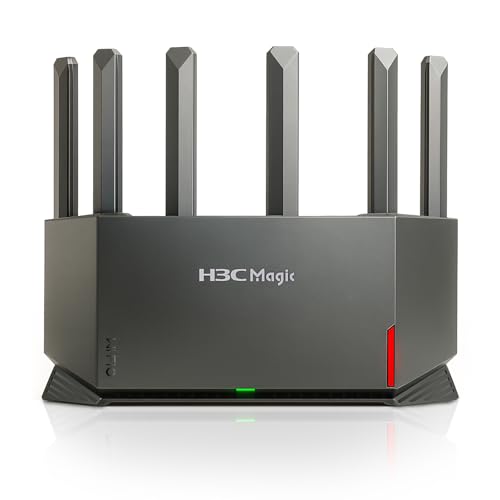 | Best Parental Controls | WiFi Standard: WiFi 6 (Dual-Band) | Maximum WiFi Speed: 5400 Mbps | Coverage Area: Whole-home, long range | CHECK ON AMAZON | Read Our Analysis |
| NETGEAR Nighthawk Tri-Band WiFi 6E Router (RAXE300) |  | Best Premium | WiFi Standard: WiFi 6E (Tri-Band) | Maximum WiFi Speed: 7800 Mbps | Coverage Area: 2500 sq. ft. | CHECK ON AMAZON | Read Our Analysis |
More Details on Our Top Picks
TP-Link AXE5400 WiFi 6E Router (Archer AXE75)
Looking to eliminate lag during intense VR sessions? The TP-Link AXE5400 WiFi 6E Router delivers the speed you need. With tri-band technology reaching 5400 Mbps total, you’ll get 2402 Mbps on both 6GHz and 5GHz bands, plus 574 Mbps on 2.4GHz. The new 6GHz band provides exceptional bandwidth with near-zero latency, making it ideal for responsive gaming and video chatting. Its quad-core CPU and 512MB RAM handle multiple devices effortlessly. OneMesh compatibility lets you extend coverage throughout your home seamlessly. You’ll also enjoy robust security features including VPN support and TP-Link HomeShield protection. This 2025 PCMag Editors’ Choice router works with all major ISPs.
- WiFi Standard:WiFi 6E (Tri-Band)
- Maximum WiFi Speed:5400 Mbps
- Coverage Area:Not specified
- Security Technology:WPA3, VPN support, HomeShield
- Device Support Capacity:Not specified
- Gigabit Ethernet Ports:Multiple (standard)
- Additional Feature:6GHz band support included
- Additional Feature:OneMesh whole-home compatibility
- Additional Feature:VPN server/client support
TP-Link AX1800 WiFi 6 Router (Archer AX21)
Need a budget-friendly WiFi 6 router that won’t compromise on VR streaming performance? The TP-Link AX1800 (Archer AX21) delivers exactly that. With 1.8 Gbps total bandwidth—1200 Mbps on 5 GHz and 574 Mbps on 2.4 GHz—you’ll get smooth VR streaming without breaking the bank. Wi-Fi 6 technology reduces congestion, while OFDMA enables simultaneous data transmission to multiple devices. Four high-gain antennas with beamforming ensure stable coverage for your headset. The router works with all major ISPs and includes VPN servers for security. You’ll appreciate the Tether app for firmware updates and Easy Mesh compatibility for expanded coverage.
- WiFi Standard:WiFi 6 (Dual-Band)
- Maximum WiFi Speed:1800 Mbps
- Coverage Area:Not specified
- Security Technology:WPA3, CISA Secure-by-Design, VPN Server
- Device Support Capacity:Not specified
- Gigabit Ethernet Ports:Standard configuration
- Additional Feature:Works with Amazon Alexa
- Additional Feature:Easy Mesh compatibility
- Additional Feature:Expert support included
TP-Link AX5400 WiFi 6 Router (Archer AX73)
The TP-Link Archer AX73 delivers robust performance for VR streamers who demand reliable connectivity without breaking the bank. You’ll get up to 5400 Mbps speeds with 4T4R and HE160 technologies on the 5 GHz band, enabling 4.8 Gbps ultra-fast connections. The router’s six antennas and beamforming technology concentrate signal toward your devices, ensuring stable coverage throughout your home. MU-MIMO and OFDMA technologies reduce congestion and boost average throughput by 4X. You’ll appreciate the HomeShield security suite featuring IoT device identification, parental controls, and QoS management. With a USB 3.0 port for media sharing and compatibility across all major ISPs, this router handles VR streaming demands efficiently.
- WiFi Standard:WiFi 6 (Dual-Band)
- Maximum WiFi Speed:5400 Mbps
- Coverage Area:Not specified
- Security Technology:WPA3, HomeShield, Basic Network Security
- Device Support Capacity:Not specified
- Gigabit Ethernet Ports:Standard configuration
- Additional Feature:USB 3.0 media sharing
- Additional Feature:6 high-power antennas
- Additional Feature:Enhanced heat ventilation design
NETGEAR 4-Stream WiFi 6 Router (R6700AX)
NETGEAR’s 4-Stream WiFi 6 Router (R6700AX) delivers solid performance for budget-conscious users who want reliable WiFi 6 connectivity without premium pricing. This AX1800 router covers up to 1,500 square feet and supports twenty devices simultaneously, making it practical for most households. You’ll get four 1 Gig Ethernet ports for wired connections to gaming consoles, computers, and streaming devices. Remember that you’ll need a separate cable modem to use this router—it doesn’t include modem functionality. Built-in security features protect your network, and it’s compatible with any ISP offering speeds up to 1 Gbps. While not top-tier, it’s a dependable choice for VR streaming on a budget.
- WiFi Standard:WiFi 6 (Dual-Band)
- Maximum WiFi Speed:1800 Mbps
- Coverage Area:1500 sq. ft.
- Security Technology:Built-in security measures
- Device Support Capacity:Up to 20 devices
- Gigabit Ethernet Ports:4 x 1 Gig ports
- Additional Feature:Supports up to 20 devices
- Additional Feature:1,500 sq. ft. coverage
- Additional Feature:4x 1 Gig Ethernet ports
TP-Link AC1200 Gigabit WiFi Router (Archer A6)
For budget-conscious users who don’t want to compromise on performance, TP-Link’s Archer A6 delivers solid WiFi coverage without the premium price tag. You’ll get 1200 Mbps speeds across dual bands, with four external antennas using Beamforming technology to extend your range. MU-MIMO on the 5GHz band handles multiple devices simultaneously, making it capable of 4K streaming with minimal buffering. The router supports Access Point Mode for flexible network expansion and features WPA3 security. Its Gigabit LAN ports ensure fast wired connections, while OneMesh compatibility lets you build a seamless whole-home network. It’s compatible with major ISPs, though you’ll need a modem to get started.
- WiFi Standard:WiFi 5 AC (Dual-Band)
- Maximum WiFi Speed:1200 Mbps
- Coverage Area:Not specified
- Security Technology:WPA3
- Device Support Capacity:Not specified
- Gigabit Ethernet Ports:4 Gigabit LAN ports
- Additional Feature:OneMesh whole-home compatibility
- Additional Feature:Access Point mode available
- Additional Feature:WPA3 latest security protocol
Davolink Minions WiFi 6E Gaming Router Mesh System
Looking to eliminate WiFi dead zones while supporting up to 100 simultaneous devices? The Davolink Minions WiFi 6E Gaming Router Mesh System delivers impressive performance for VR streaming. You’ll get ultra-fast dual-band speeds up to 1.77Gbps, with advanced Wi-Fi 6 technology providing 2×2 MIMO and OFDMA for lower latency in busy networks. The mesh system expands seamlessly across large spaces, eliminating coverage gaps without extra cabling. Gigabit ports ensure optimized wired speeds for demanding applications like 4K streaming and video conferencing. WPA3 encryption protects your data, making this router ideal for serious gamers and VR enthusiasts seeking reliable, secure connectivity.
- WiFi Standard:WiFi 6 (Dual-Band)
- Maximum WiFi Speed:1770 Mbps
- Coverage Area:Large homes/offices
- Security Technology:WPA3 encryption
- Device Support Capacity:Up to 100 devices
- Gigabit Ethernet Ports:Gigabit WAN/LAN ports
- Additional Feature:Connect 100+ devices simultaneously
- Additional Feature:Mesh extender system included
- Additional Feature:Eliminates network dead zones
TP-Link Archer AX55 Dual-Band Wi-Fi 6 Router
The Archer AX55 delivers the speed and reliability you’ll need for seamless VR streaming—how? Through Wi-Fi 6 technology combining 2402 Mbps on 5 GHz and 574 Mbps on 2.4 GHz. OFDMA technology lets multiple devices share bandwidth simultaneously, reducing latency and jitter—critical for immersive VR experiences. You’ll appreciate the four high-gain antennas with beamforming that maintain strong coverage throughout your home. The router’s improved cooling system ensures consistent top speeds regardless of environmental conditions. HomeShield security protects your network and IoT devices, while Alexa compatibility offers convenient voice control. Compatible with major ISPs, the Archer AX55 provides affordable, dependable performance for your VR streaming needs.
- WiFi Standard:WiFi 6 (Dual-Band)
- Maximum WiFi Speed:2976 Mbps
- Coverage Area:Not specified
- Security Technology:WPA3, HomeShield, Alexa compatible
- Device Support Capacity:Not specified
- Gigabit Ethernet Ports:Standard configuration
- Additional Feature:Target Wake Time efficiency
- Additional Feature:Works with Amazon Alexa
- Additional Feature:Larger heat sink included
ASUS RT-AX1800S WiFi 6 Extendable Router
ASUS’s RT-AX1800S brings WiFi 6 technology to budget-conscious users who don’t want to compromise on streaming performance or smart home connectivity. You’ll benefit from MU-MIMO and OFDMA technology that efficiently handles multiple devices simultaneously—crucial for VR streaming. The router’s four external antennas deliver reliable coverage, while five Gigabit ports (1 WAN, 4 LAN) ensure wired connections for your most demanding devices. AiMesh compatibility lets you expand your network seamlessly. Built-in AiProtection Classic security and ASUS Instant Guard VPN protect your data without subscriptions. Its dual-core processor with 4 VPE handles gaming and streaming workloads effectively, making it an excellent value choice for immersive content consumption.
- WiFi Standard:WiFi 6 (Dual-Band)
- Maximum WiFi Speed:1800 Mbps
- Coverage Area:Not specified
- Security Technology:AiProtection Classic, ASUS Instant Guard VPN
- Device Support Capacity:Not specified
- Gigabit Ethernet Ports:5 Gigabit ports (1 WAN, 4 LAN)
- Additional Feature:AiMesh compatible expandable system
- Additional Feature:ASUS Instant Guard VPN
- Additional Feature:Commercial-grade Trend Micro security
ARRIS Surfboard Wi-Fi 6E Access Point (W6U)
Want to upgrade your existing network without replacing your router entirely? The ARRIS Surfboard mAX Wi-Fi 6E Access Point (W6U) transforms your setup by adding a dedicated 6 GHz band for compatible devices. You’ll experience among the fastest home wireless speeds available, with reduced lag, jitter, and disconnections—crucial for VR streaming. The 6 GHz band minimizes congestion and supports more simultaneous devices, including 8K TVs and AR applications. Setup’s straightforward: plug it into your existing router, and you’re ready within minutes. It’s compatible with any router, gateway, and ISP, making this an effortless upgrade path for serious streaming enthusiasts.
- WiFi Standard:WiFi 6E Access Point
- Maximum WiFi Speed:Up to 6E speeds (exact Mbps not specified)
- Coverage Area:Not specified
- Security Technology:Not specified
- Device Support Capacity:Not specified
- Gigabit Ethernet Ports:Gigabit ports (exact number not specified)
- Additional Feature:Dedicated 6 GHz band
- Additional Feature:Supports 8K TVs/AR
- Additional Feature:Works with existing router
NETGEAR Nighthawk AX5400 WiFi 6 Router (RAX50)
If you’re seeking reliable WiFi 6 performance without premium pricing, NETGEAR’s Nighthawk AX5400 (RAX50) delivers solid speeds up to 5.4 Gbps across its dual-band network. You’ll get coverage spanning 2,500 square feet, supporting up to 25 devices simultaneously—ideal for VR streaming without congestion. The router features four 1G Ethernet ports plus USB 3.0 for cloud storage access. It’s compatible with any ISP up to 1 Gbps and replaces your existing router seamlessly. NETGEAR Armor provides automatic security protection with a 30-day free trial, and you’re backed by a one-year limited warranty.
- WiFi Standard:WiFi 6 (Dual-Band)
- Maximum WiFi Speed:5400 Mbps
- Coverage Area:2500 sq. ft.
- Security Technology:NETGEAR Armor (30-day trial)
- Device Support Capacity:Up to 25 devices
- Gigabit Ethernet Ports:4 x 1G ports + 1 x USB 3.0
- Additional Feature:USB 3.0 storage sharing
- Additional Feature:Supports up to 25 devices
- Additional Feature:2,500 sq. ft. coverage
TP-Link Archer GE400 WiFi 7 Gaming Router
The Archer GE400 stands out for competitive gamers and VR streamers who demand minimal latency and maximum bandwidth. You’ll appreciate its dedicated gaming port and WTFast acceleration, which prioritize your traffic for smoother gameplay. With BE6500 WiFi 7 speeds reaching 5765 Mbps on 5 GHz, you’re getting robust performance across 2,600 square feet. The router supports up to 90 devices simultaneously, making it ideal for households with multiple VR headsets and streaming equipment. Its multi-gig ports pair perfectly with modern internet plans, while HomeShield provides essential network security. EasyMesh compatibility ensures seamless roaming between nodes without disconnections during immersive experiences.
- WiFi Standard:WiFi 7 (Dual-Band)
- Maximum WiFi Speed:6500 Mbps (BE6500)
- Coverage Area:2600 sq. ft.
- Security Technology:TP-Link Cybersecurity, HomeShield
- Device Support Capacity:Up to 90 devices
- Gigabit Ethernet Ports:1 x 2.5 Gbps WAN/LAN, 1 x 2.5 Gbps LAN, 3 x 1 Gbps LAN
- Additional Feature:Dedicated multi-gig gaming port
- Additional Feature:WTFast game server acceleration
- Additional Feature:RGB gaming lighting included
NETGEAR Nighthawk WiFi 6 Router (RAX36)
For those seeking reliable mid-range performance without breaking the bank, NETGEAR’s Nighthawk RAX36 delivers solid WiFi 6 capabilities that won’t leave your VR streaming setup wanting. You’ll get AX3000 speeds up to 3 Gbps across dual bands, covering 2,000 sq. ft. and supporting 25 devices simultaneously. The router’s four Gigabit Ethernet ports ensure stable wired connections for your modem, while USB 3.0 adds flexibility. NETGEAR Armor’s included security suite protects against malware and hackers during your VR sessions. Though you’ll need a separate cable modem, this router works with any ISP up to 1 Gbps, making it an accessible choice for immersive streaming without premium pricing.
- WiFi Standard:WiFi 6 (Dual-Band)
- Maximum WiFi Speed:3000 Mbps
- Coverage Area:2000 sq. ft.
- Security Technology:NETGEAR Armor (30-day trial)
- Device Support Capacity:Up to 25 devices
- Gigabit Ethernet Ports:4 x 1G ports + USB 3.0
- Additional Feature:Supports up to 25 devices
- Additional Feature:USB 3.0 port included
- Additional Feature:Built-in VPN via Armor
H3C AX5400 WiFi 6 Router with Parental Controls
Looking for a router that handles both high-performance VR streaming and keeps your kids’ online activity in check? The H3C AX5400 delivers. This WiFi 6 router reaches 4804 Mbps on 5GHz, providing the stable, low-latency connectivity VR demands. Six high-gain antennas ensure consistent coverage throughout your home. You’ll appreciate the subscription-free parental controls, allowing you to monitor internet usage, set WiFi schedules, and filter URLs—all manageable via smartphone app. WPA3 security and VPN support protect your network. It’s not a modem, so you’ll need ISP equipment, but setup’s straightforward. The NX54 model supports dozens of devices simultaneously, perfect for families balancing entertainment and online safety.
- WiFi Standard:WiFi 6 (Dual-Band)
- Maximum WiFi Speed:5400 Mbps
- Coverage Area:Whole-home, long range
- Security Technology:WPA3, VPN, Parental Controls
- Device Support Capacity:Dozens of devices
- Gigabit Ethernet Ports:Standard configuration (exact number not specified)
- Additional Feature:Subscription-free lifetime parental controls
- Additional Feature:Customizable WiFi schedule management
- Additional Feature:NPU-based processing power
NETGEAR Nighthawk Tri-Band WiFi 6E Router (RAXE300)
Why settle for standard WiFi 6 when you can upgrade to WiFi 6E? The NETGEAR Nighthawk RAXE300 delivers AXE7800 speeds with a dedicated 6GHz band for lag-free VR and 4K streaming. Its 1.7GHz quad-core processor powers 40 devices across 2,500 sq. ft., while eight streams ensure smooth performance. You’ll appreciate the 2.5G Ethernet port for wired connections and backward compatibility with existing devices. NETGEAR Armor’s 30-day trial protects against malware and identity theft. Whether you’re streaming 8K content or gaming in AR/VR, this tri-band router handles it all effortlessly.
- WiFi Standard:WiFi 6E (Tri-Band)
- Maximum WiFi Speed:7800 Mbps
- Coverage Area:2500 sq. ft.
- Security Technology:NETGEAR Armor (30-day trial)
- Device Support Capacity:Up to 40 devices
- Gigabit Ethernet Ports:4 x 1G ports + 1 x 2.5G port
- Additional Feature:6GHz band WiFi 6E
- Additional Feature:Supports up to 40 devices
- Additional Feature:2.5G Ethernet port included
Factors to Consider When Choosing WiFi 6 Routers for VR Streaming
When you’re shopping for a WiFi 6 router designed for VR streaming, you’ll want to prioritize bandwidth and speed to handle multiple high-demand applications simultaneously. You should also evaluate latency performance, device connection capacity, and whether the router supports the newer 6GHz band for less congestion and faster data transmission. Finally, consider your space’s layout and whether you need coverage area extension features to maintain consistent signal strength throughout your environment.
Bandwidth and Speed Requirements
How much speed does your VR setup actually need? You’ll want a router delivering at least 1 Gbps+ on the 5 GHz band, where Wi-Fi 6 typically excels. Don’t get fooled by marketing numbers like AX5400—those figures aggregate all bands, not real per-band performance. What matters for VR streaming is sustained, dedicated throughput on your primary connection.
Beyond raw speed, you need low latency. Your router’s processing delays significantly impact immersion and responsiveness. Look for models featuring QoS prioritization and game acceleration features that optimize VR traffic specifically.
Consider dual-band stability too. While 5 GHz handles your main VR stream, a reliable 2.4 GHz fallback ensures connectivity in dense environments. If supporting multiple VR devices simultaneously, prioritize routers with OFDMA and MU-MIMO technologies that distribute bandwidth efficiently without creating bottlenecks.
Low Latency Performance
While bandwidth ensures you’ve got enough pipe for your VR stream, latency determines whether you’ll actually feel immersed or queasy. You’ll want a router with OFDMA and MU-MIMO technology, which reduce contention and keep response times snappy across multiple devices.
Look for 160 MHz channel width support at minimum, and consider WiFi 6E models offering 6 GHz access—both significantly cut airtime delay for smoother motion. A quad-core processor with substantial RAM handles multiple VR streams efficiently, minimizing processing-induced lag.
Prioritize routers featuring robust QoS and gaming-focused capabilities that’ll prioritize your VR traffic and maintain consistent frame delivery. Finally, strong beamforming and multiple high-gain antennas sustain low latency throughout your space, reducing packet travel time and wireless interference.
Device Connection Capacity
Scalability is the backbone of reliable VR streaming, especially when you’re juggling multiple headsets, controllers, and peripherals simultaneously. You’ll want routers that support 40–90 connected devices without choking under the load. This capacity prevents congestion that’d tank your immersive experience.
Look for models equipped with OFDMA and MU-MIMO technologies. These features let your router efficiently handle multiple VR devices at once, distributing bandwidth intelligently rather than forcing devices to queue up for connection time.
Pair this with solid processor specs—quad-core CPUs and substantial RAM (hundreds of MB)—to maintain consistent throughput across all your gear. A router that can’t process requests quickly becomes a bottleneck, degrading performance regardless of your internet speed.
Check the total bandwidth rating too. Higher ceilings like AX5400 or AXE7800 give you headroom for simultaneous VR streams.
6GHz Band Availability
What if you could eliminate half your network congestion without upgrading your internet plan? That’s where 6GHz band availability comes in. WiFi 6E routers access the 6GHz spectrum, which significantly reduces interference and latency for VR streaming when you’re using compatible devices. However, you’ll need 6E-compatible clients to tap into these benefits—your older 2.4GHz and 5GHz devices won’t access 6GHz at all. Some routers separate the 6GHz network entirely, requiring deliberate client connection. While 6GHz doesn’t guarantee universal performance improvements, it substantially decreases jitter and latency in bandwidth-heavy VR applications when nearby 6E clients are active. Performance ultimately hinges on your device adoption rate and local interference levels in that spectrum.
Coverage Area Extension
How far can your VR signal reach? Choosing a router with strong high-gain antennas and beamforming technology ensures your VR devices stay connected across larger spaces. You’ll want to consider mesh or extender compatibility—EasyMesh and OneMesh standards let you expand coverage throughout multiple rooms without dead zones that could interrupt your streaming.
For multi-room VR setups, assess your home’s layout and plan router placement strategically. You may need additional nodes to maintain stable streams in distant areas. Higher bandwidth routers (AX5400 and above) support simultaneous VR data alongside other devices, preventing performance drops. In crowded environments, 6 GHz Wi-Fi 6E support reduces interference, further stabilizing your connection across the entire coverage area.
Security and Stability Features
Since VR streaming demands both secure and reliable connections, you’ll want routers equipped with WPA3 encryption to protect your data and login credentials from unauthorized access. Beyond encryption, look for built-in security suites like HomeShield that safeguard IoT devices connected to your network, reducing potential vulnerabilities.
For stability, prioritize routers supporting OFDMA, MU-MIMO, and beamforming technologies. These features distribute bandwidth efficiently across multiple devices, maintaining consistent VR performance even on congested networks. Additionally, 6E and 6 GHz band support significantly reduce interference and latency, creating smoother streaming experiences.
Consider VPN server/client capabilities if you’re accessing VR setups remotely or securing your home network. Together, these security and stability features ensure your VR sessions remain protected and uninterrupted.
Frequently Asked Questions
How Much Latency Is Acceptable for Smooth VR Streaming Without Motion Sickness?
You’ll want to keep latency below 20 milliseconds for smooth VR streaming. Ideally, you’re targeting under 10ms to prevent motion sickness. Any higher and you’ll notice lag that’ll make your experience uncomfortable and disorienting.
What’s the Difference Between Wifi 6 and Wifi 6E for VR Applications?
You’ll find WiFi 6E gives you access to the 6GHz band, reducing congestion and latency for your VR streaming. WiFi 6 stays on 2.4GHz and 5GHz, making 6E superior for demanding VR applications requiring minimal interference.
Can I Use Mesh Systems to Improve VR Streaming Coverage in Large Homes?
You can absolutely use mesh systems to improve VR streaming coverage in large homes. They’ll eliminate dead zones and maintain consistent connectivity throughout your space, ensuring smooth VR performance wherever you’re playing.
How Do I Prioritize VR Traffic Over Other Devices on My Network?
You’ll access your router’s Quality of Service (QoS) settings to prioritize VR traffic. You can assign higher bandwidth priority to your VR device’s IP address or MAC address, ensuring it’ll receive dedicated network resources over other devices.
What Upload Speeds Do I Need for Cloud-Based VR Streaming Services?
You’ll need minimum 10-25 Mbps upload speeds for cloud-based VR streaming, though 50+ Mbps is ideal for consistent performance. Higher speeds reduce latency and prevent motion sickness from lag.




Leave a Reply