

You’ve invested in quality VR gear, but you’re storing it in a drawer or tossing it on a shelf. That’s asking for damage. The right display stand protects your headset, organizes your controllers, and actually looks good doing it. We’ll break down seven stands that balance durability with style—and reveal which features truly matter when you’re deciding where to spend your money.
| AMVR Universal VR Headset Display Dock Stand |  | Most Versatile | Primary Compatibility: Quest 3S/3/2, Vision Pro, Pico 4, PSVR 2, Valve Index, HP Reverb G2 | Charging Capability: No charging | Build Material: ABS plastic with silicone gasket | CHECK ON AMAZON | Read More |
| VR Headset Charging Dock for Meta Quest 3/3S/2 |  | Best Charging Option | Primary Compatibility: Meta Quest 2/3/3S, most Type-C VR headsets | Charging Capability: Type-C charging (3-5 hours) | Build Material: High-quality ABS plastic | CHECK ON AMAZON | Read More |
| Nargos VR Stand for Meta Quest 2 & Quest 3 |  | Cutest Design | Primary Compatibility: Meta Quest 2, Quest 3 | Charging Capability: No charging | Build Material: High-quality ABS material | CHECK ON AMAZON | Read More |
| DigiCharge VR Headset Stand for Meta Quest 3S/3/2 |  | Best Value | Primary Compatibility: Meta Quest 3S/3/2, Quest Pro | Charging Capability: No charging | Build Material: Not specified | CHECK ON AMAZON | Read More |
| Dollox VR Headset Stand for Oculus Quest & Valve Index |  | Most Stable | Primary Compatibility: Oculus Quest 2/3/3s, Rift, Rift S, Valve Index, HP Reverb G2, HTC Vive, Vive Pro | Charging Capability: No charging | Build Material: High-quality ABS material | CHECK ON AMAZON | Read More |
| Digicharge VR Headset Display Stand Universal Holder |  | Universal Pick | Primary Compatibility: Meta Quest 3/2, Rift S, HTC Vive, Valve Index, PSVR | Charging Capability: No charging | Build Material: Not specified | CHECK ON AMAZON | Read More |
| VR Stand Display Holder for Oculus Quest & Valve Index | 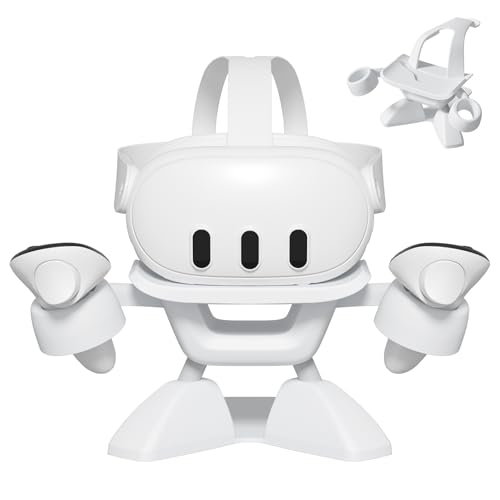 | Best Overall | Primary Compatibility: Oculus Quest 2/3, Rift S, Valve Index, HP Reverb G2, HTC Vive, Vive Pro | Charging Capability: No charging | Build Material: High-quality, durable ABS | CHECK ON AMAZON | Read More |
More Details on Our Top Picks
AMVR Universal VR Headset Display Dock Stand
Why settle for a flimsy stand when you’re investing in premium VR gear? The AMVR Universal VR Headset Display Dock Stand delivers stability and style with its enlarged round base and heavyweight construction. You’ll appreciate the non-slip silicone gasket that keeps your headset secure on any surface. The round-top design protects your lenses from scratches, while the integrated storage keeps your controllers organized in the bottom tray or bracket hook. Compatible with Quest 3S, Quest 3, Vision Pro, PSVR 2, and numerous other headsets, this stand works as both a practical storage solution and an impressive display piece. Installation’s straightforward—just snap the components together following the included manual.
- Primary Compatibility:Quest 3S/3/2, Vision Pro, Pico 4, PSVR 2, Valve Index, HP Reverb G2
- Charging Capability:No charging
- Build Material:ABS plastic with silicone gasket
- Assembly Required:Easy snap-buckle installation
- Storage & Organization:Headset, controllers (bottom tray), accessories
- Stability & Base Design:Enlarged round base with non-slip silicone gasket
- Additional Feature:Round-top lens protection design
- Additional Feature:Diversified accessory storage capacity
- Additional Feature:Controllers holder bracket hook
VR Headset Charging Dock for Meta Quest 3/3S/2
If you’re juggling multiple Meta Quest headsets or want a unified charging solution that keeps your gear organized and protected, the VR Headset Charging Dock for Meta Quest 3/3S/2 delivers both functionality and display appeal. The dock charges your headset via Type-C in 3–5 hours using standard power adapters while providing dedicated storage for controllers—even those wearing silicone sleeves. Built from high-quality ABS plastic with an enlarged base and non-slip pads, it won’t tip over. The tilted tray design balances your headset’s center of gravity, preventing wobble. Assembly requires no tools, and its compact footprint accommodates most headsets with Type-C ports, making it an excellent organizational hub.
- Primary Compatibility:Meta Quest 2/3/3S, most Type-C VR headsets
- Charging Capability:Type-C charging (3-5 hours)
- Build Material:High-quality ABS plastic
- Assembly Required:Easy assembly, no tools needed
- Storage & Organization:Headset, touch controllers
- Stability & Base Design:Enlarged base with four non-slip pads, tilted tray
- Additional Feature:Type-C charging capability included
- Additional Feature:3-5 hour charging time
- Additional Feature:Silicone sleeve compatibility maintained
Nargos VR Stand for Meta Quest 2 & Quest 3
Looking for a display stand that’s both functional and charming? The Nargos Stand delivers with its adorable robot-like design that doubles as a conversation starter. You’ll appreciate the high-quality ABS material and robust triangular base that keeps your Meta Quest 2 or Quest 3 securely positioned while protecting lenses from scratches. Assembly takes just five steps, and you’re set. Beyond your headset, you can organize touch controllers, headphones, and VR accessories in one convenient spot. It’s the perfect solution for keeping your gaming area clutter-free and showcasing your VR setup with style.
- Primary Compatibility:Meta Quest 2, Quest 3
- Charging Capability:No charging
- Build Material:High-quality ABS material
- Assembly Required:Five-step effortless assembly
- Storage & Organization:Headset, controllers, headphones, VR accessories, cables
- Stability & Base Design:Sturdy triangular base
- Additional Feature:Cute robot-like appearance design
- Additional Feature:Triangular base stability structure
- Additional Feature:Conversation starter aesthetic appeal
DigiCharge VR Headset Stand for Meta Quest 3S/3/2
Meta Quest owners who want a reliable, hassle-free display solution won’t find better value than the DigiCharge stand. You’ll appreciate its universal compatibility with Meta Quest 3S, 3, 2, and Pro headsets, making it a future-proof investment. The sturdy non-slip base keeps your headset secure and prevents tipping, while the sleek white design complements modern gaming setups without cluttering your space. Assembly takes under a minute—no tools required, just click-and-slot installation. Its lightweight, durable construction makes it travel-friendly, so you can protect your headset anywhere. You’re getting vertical storage efficiency that maximizes desk space while showcasing your gear.
- Primary Compatibility:Meta Quest 3S/3/2, Quest Pro
- Charging Capability:No charging
- Build Material:Not specified
- Assembly Required:Tool-free, under 1 minute
- Storage & Organization:Headset display only
- Stability & Base Design:Premium non-slip base, strong frame
- Additional Feature:Sleek white modern design
- Additional Feature:Under 1-minute setup time
- Additional Feature:Travel-friendly lightweight construction
Dollox VR Headset Stand for Oculus Quest & Valve Index
Want a display stand that works with practically any VR headset you own? The Dollox VR Headset Stand delivers impressive compatibility across Quest 2, Quest 3, Valve Index, HP Reverb G2, and HTC Vive models. You’ll appreciate its triangular base design that keeps your headset stable and protected without touching the lens. Assembly takes just five minutes without tools. Beyond headsets, you can store controllers, headphones, and cables on dedicated hooks, keeping your desk organized and ready for play. Made from durable ABS material, this stand measures 12 x 12 x 7 inches and solves common storage challenges effectively.
- Primary Compatibility:Oculus Quest 2/3/3s, Rift, Rift S, Valve Index, HP Reverb G2, HTC Vive, Vive Pro
- Charging Capability:No charging
- Build Material:High-quality ABS material
- Assembly Required:Five-step assembly, no tools required
- Storage & Organization:Headset, controllers, headphones, accessories, cables
- Stability & Base Design:Stable triangular structure
- Additional Feature:Lens-contact prevention design feature
- Additional Feature:Holds headphones and accessories
- Additional Feature:12x12x7 compact installed size
Digicharge VR Headset Display Stand Universal Holder
If you’ve got multiple VR headsets from different manufacturers, you’ll appreciate the Digicharge’s universal compatibility—it accommodates Meta Quest 3, Quest 2, Rift S, HTC Vive, Valve Index, PSVR, and most other major headsets without additional adapters. The stand features a wide, stable base with rubber feet that prevents tipping and protects your surfaces from scratches. You’ll assemble it in seconds using tool-free interlocking parts, then enjoy a tidier VR setup with your headset safely displayed and protected from accidental falls or clutter. It’s a practical, space-saving solution for organizing your gaming area.
- Primary Compatibility:Meta Quest 3/2, Rift S, HTC Vive, Valve Index, PSVR
- Charging Capability:No charging
- Build Material:Not specified
- Assembly Required:Simple tool-free setup, ready in seconds
- Storage & Organization:Headset and controllers display
- Stability & Base Design:Wide sturdy base with rubber feet
- Additional Feature:Rubber feet surface protection
- Additional Feature:Stylish gear showcase display
- Additional Feature:Interlocking quick-assembly parts system
VR Stand Display Holder for Oculus Quest & Valve Index
Looking for a display solution that accommodates multiple headset models without requiring tools or technical expertise? This VR Stand offers universal compatibility with Oculus Quest 2, Quest 3, Valve Index, and most standard headsets. You’ll appreciate its durable ABS construction and stable triangular base that securely holds your equipment. The smart design keeps your lens scratch-free, while dedicated hooks organize your controllers, headphones, and cables. Setup takes five simple steps—no tools needed. You get everything organized and ready to play, transforming your VR gear into an impressive desktop display that maximizes your space efficiently.
- Primary Compatibility:Oculus Quest 2/3, Rift S, Valve Index, HP Reverb G2, HTC Vive, Vive Pro
- Charging Capability:No charging
- Build Material:High-quality, durable ABS
- Assembly Required:Five-step process, no tools needed
- Storage & Organization:Headset, controllers, headphones, accessories, cables
- Stability & Base Design:Stable triangular base
- Additional Feature:Smart lens-scratch protection design
- Additional Feature:Headphones and cable hooks
- Additional Feature:Five-step assembly process included
Factors to Consider When Choosing Display Stands for VR
You’ll want to evaluate headset compatibility first, ensuring the stand accommodates your specific VR device without forcing it into an ill-fitting mount. Stability and build quality matter tremendously—you’re investing in protection, so look for stands with sturdy materials, secure grips, and a low center of gravity that won’t topple over. Consider storage features, assembly difficulty, and whether the stand includes lens protection mechanisms, as these practical elements determine how well the stand integrates into your space and safeguards your equipment.
Headset Compatibility
What makes a VR display stand truly versatile? Headset compatibility. You’ll want to verify that your stand supports your specific model—whether that’s a Quest 2, Quest 3, Quest 3S, or Quest Pro. But don’t stop there. Check if it accommodates third-party headsets like Valve Index, PSVR 2, or HP Reverb.
Consider the physical design too. Your stand should fit various head strap sizes and bulky controllers without requiring removal. Look for stands supporting standardized ports like Type-C charging, which simplifies compatibility across brands.
Additionally, confirm whether the stand stores both your headset and controllers together. Some models include space for accessories like headphones or cables. Verify if adapters or modifications are necessary for non-standard headsets. Broad compatibility claims matter only when they explicitly include your specific brands and models.
Stability and Build Quality
While compatibility guarantees your stand fits your headset, stability and build quality determine whether it’ll actually protect your gear. You’ll want a stand with an enlarged footprint and non-slip pads that prevent tipping when you’re placing or removing your headset. Look for sturdy frames constructed from solid materials like ABS plastic to support varying headset weights over time.
A triangular or wide-base design distributes weight evenly, maintaining balance and reducing wobble. Non-slip bases and rubber feet secure your stand while protecting your surfaces from scratches. Tilt-balanced or gravity-safe trays keep your headset centered, eliminating accidental toppling risks. These stability features work together to ensure your VR gear stays safely displayed and protected from damage.
Storage and Organization
How cluttered is your desk right now? A quality VR stand transforms that chaos into organized simplicity. You’ll appreciate dedicated spaces for your headset and separate hooks or trays that corral controllers, cables, and accessories in one spot. This organization dramatically reduces desk clutter and makes your setup look intentional rather than scattered.
Look for stands with expandable storage capacity—they’ll accommodate headphones, extension cables, and third-party strap covers you’ll inevitably collect. The best models feature round or wide bases that maximize stability while offering multiple storage points without consuming excessive space.
You’ll also want tool-free assembly and quick disassembly capabilities. This flexibility lets you rearrange or store your stand whenever needed, giving you complete control over your workspace configuration.
Assembly and Setup
Since you’ll want your VR stand ready to use immediately, most quality models feature tool-free assembly that takes under a minute to complete. You’ll appreciate designs using interlocking parts or snapping buckles that secure components without requiring any tools.
Setup typically follows a straightforward five-step process outlined in quick-start guides included with your stand. These instructions walk you through each phase clearly, ensuring you don’t miss critical details.
Before assembling, you’ll want to verify compatibility notes provided in the setup steps. This ensures your specific headset model fits properly on the stand. Taking a moment to review these compatibility details prevents frustration and guarantees your display stand accommodates your gear perfectly from day one.
Lens Protection Features
Your VR headset’s lenses represent one of its most vulnerable components, and a quality display stand shields them from scratches, dust, and accidental damage. Look for stands featuring round-top or capped designs that prevent direct lens contact when you’re placing or removing your headset. Many reputable models incorporate elevated support systems and stable, non-slip bases that keep your device away from surfaces, minimizing lens abrasion. Dedicated headset trays or cradles distribute weight evenly without pressing on sensitive optics, preserving proper alignment. Additionally, consider stands with silicone-touch surfaces or lens-protecting padding that reduce pressure during storage. These thoughtful design elements ensure your lenses remain pristine and your headset functions optimally for years to come.
Space and Design
While lens protection keeps your optics safe, the physical footprint and design of your stand determine whether it’ll actually fit in your space and serve you daily. You’ll want a vertical design that maximizes desk real estate while keeping your headset and controllers within arm’s reach. Look for stands with dedicated trays for your headset and separate hooks for controllers and accessories, which significantly reduces clutter. A compact footprint matters too—choose universal stands that accommodate multiple VR headsets without requiring replacements as your collection grows. An enlarged base with non-slip pads prevents tipping on desks or shelves, ensuring your valuable gear stays secure. Prioritize stands that balance functionality with aesthetics to showcase your equipment effectively.
Frequently Asked Questions
How Do VR Display Stands Protect Headsets From Dust and Environmental Damage Long-Term?
You’ll protect your headset through enclosed display cases that block dust particles and UV rays. Sealed stands feature tempered glass doors, preventing environmental contaminants from degrading lenses and electronics over time.
Can VR Stands Accommodate Multiple Headsets Simultaneously for Households With Several Users?
You’ll find many modern VR stands designed with multiple mounting points that accommodate several headsets simultaneously. They’re perfect for households with multiple users, allowing you to organize and display your collection efficiently while keeping everything protected and accessible.
What Cable Management Solutions Do VR Stands Offer for Organizing Charging and Sensor Cables?
You’ll find most modern VR stands feature integrated cable trays, velcro straps, and clips that organize your charging and sensor cables neatly. They keep everything untangled and accessible while maintaining a clean, organized appearance for your setup.
Are VR Display Stands Compatible With Aftermarket Lenses, Face Plates, or Custom Modifications?
You’ll find that most VR display stands accommodate aftermarket lenses and face plates without issues. However, you should verify your specific stand’s compatibility with custom modifications before purchasing, as larger or heavier components might not fit securely.
How Much Weight Can Premium VR Stands Safely Support Without Warping or Tipping Over?
You’ll find premium VR stands safely support 5-15 pounds depending on their design and materials. They’re engineered with weighted bases and reinforced frames so you won’t experience warping or tipping when displaying your standard headsets properly.




Leave a Reply