
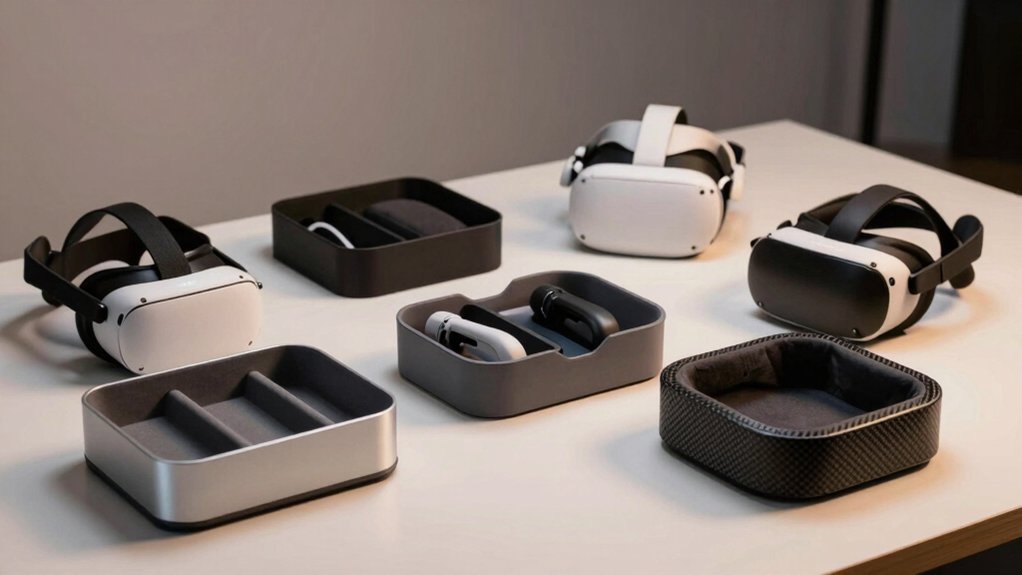
You’ve invested heavily in your VR setup, but where do you actually keep it when you’re not immersed? Your headset and controllers deserve better than a desk corner or dusty shelf. The right organizer protects your gear from damage while maximizing your space—and finding one that truly works isn’t straightforward. Let’s explore which options actually deliver.
| VRGE VR Stand Under Desk Storage Organizer |  | Best Under-Desk Storage | VR Headset Compatibility: HTC Vive, Oculus Rift, PlayStation VR2, Valve Index, Windows Mixed Reality | Installation Type: Screws and 3M VHB adhesive tape | Storage Capacity: VR headset, controllers, and accessories | CHECK ON AMAZON | Read Our Analysis |
| PEGZONE Modular Gaming Pegboard Controller Holder Wall Mount |  | Most Customizable Setup | VR Headset Compatibility: PS5, PS4, Xbox, Nintendo (controllers only; not headsets) | Installation Type: Wall-mounted pegboard with fasteners and video guides | Storage Capacity: Controllers, headphones, games; supports up to 33 lbs | CHECK ON AMAZON | Read Our Analysis |
| SOKUSIN VR Wall Mount Headset Storage Stand | 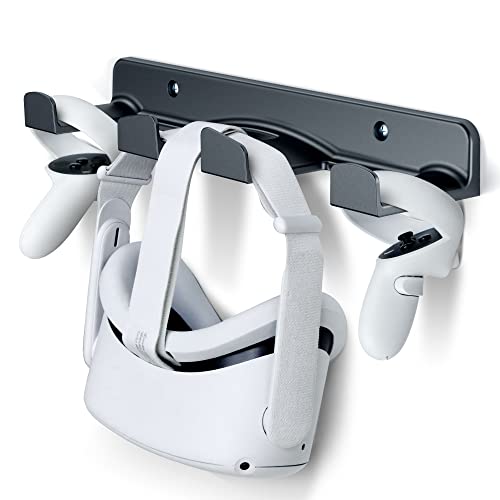 | Best Wall Mount | VR Headset Compatibility: Meta Quest, HTC Vive, Valve Index, HP Reverb G2, PlayStation VR | Installation Type: Wall-mounted with screws and plastic anchors | Storage Capacity: VR headset and controllers; supports 11 lbs | CHECK ON AMAZON | Read Our Analysis |
| SOKUSIN VR Wall Mount Stand for Meta Quest Headsets |  | Best Space-Saving | VR Headset Compatibility: Meta Quest, HTC Vive, Valve Index, HP Reverb G2, PlayStation VR | Installation Type: Wall-mounted with screws and plastic anchors | Storage Capacity: VR headset and controllers; supports 11 lbs | CHECK ON AMAZON | Read Our Analysis |
| VR Stand Headset & Controller Display Holder | 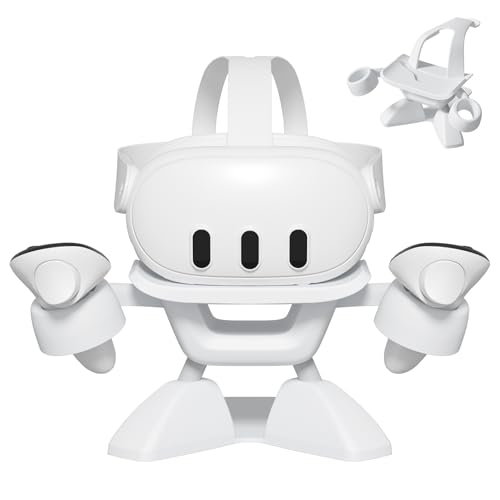 | Best Desktop Display | VR Headset Compatibility: Oculus Quest, Rift S, Valve Index, HP Reverb G2, HTC Vive | Installation Type: Desktop stand; no tools required | Storage Capacity: VR headset and controllers with accessory hooks | CHECK ON AMAZON | Read Our Analysis |
| AMVR Universal VR Headset Display Stand Dock |  | Most Stable Stand | VR Headset Compatibility: Meta Quest 3/3S, Vision Pro, Pico 4, PSVR 2, Valve Index | Installation Type: Desktop stand; snap-together assembly | Storage Capacity: VR headset and controllers in tray/bracket | CHECK ON AMAZON | Read Our Analysis |
| Magnetic Charging Dock for Valve Index VR Controller |  | Best Controller Charging | VR Headset Compatibility: Valve Index controllers only (specialized) | Installation Type: Desktop dock; magnetic charging design | Storage Capacity: Valve Index controllers only | CHECK ON AMAZON | Read Our Analysis |
More Details on Our Top Picks
VRGE VR Stand Under Desk Storage Organizer
If you’ve got multiple VR headsets gathering dust, the VRGE VR Stand Under Desk Storage Organizer is your answer. This gunmetal grey aluminum organizer mounts beneath your desk, keeping your headsets and controllers within arm’s reach while gaming. It’s compatible with HTC Vive, Oculus Quest, PlayStation VR2, Valve Index, and Windows Mixed Reality systems. Installation’s straightforward—you’ll get screws and 3M VHB tape for secure mounting. The slim design maximizes your workspace without cluttering it. Best of all, VRGE backs this organizer with a lifetime warranty, demonstrating their confidence in its durability and build quality.
- VR Headset Compatibility:HTC Vive, Oculus Rift, PlayStation VR2, Valve Index, Windows Mixed Reality
- Installation Type:Screws and 3M VHB adhesive tape
- Storage Capacity:VR headset, controllers, and accessories
- Mounting Location:Under-desk horizontal/vertical mount
- Material Construction:High-grade aluminum with gunmetal grey finish
- Special Features:Lifetime warranty; charging station capability
- Additional Feature:Lifetime warranty included
- Additional Feature:Gunmetal grey aluminum finish
- Additional Feature:Dual mounting method (screws/tape)
PEGZONE Modular Gaming Pegboard Controller Holder Wall Mount
Looking to keep your gaming controllers, headsets, and VR equipment organized without sacrificing style? The PEGZONE Modular Gaming Pegboard offers the perfect solution. You’ll customize your wall-mounted setup with modular panels that adapt to your space and needs. The 14-piece set includes adjustable disc shelves, cable hooks, and controller holders compatible with PS5, PS4, Xbox, and Nintendo devices. Its durable construction supports up to 33 lbs, keeping your gear secure and accessible. Choose from stylish finishes—Black, Black & White, or Black & Red—and enjoy easy installation with clear instructions and video guides included.
- VR Headset Compatibility:PS5, PS4, Xbox, Nintendo (controllers only; not headsets)
- Installation Type:Wall-mounted pegboard with fasteners and video guides
- Storage Capacity:Controllers, headphones, games; supports up to 33 lbs
- Mounting Location:Wall-mounted pegboard
- Material Construction:High-quality material with textured finish
- Special Features:Modular customizable pegboard; 7 or 14-piece sets available
- Additional Feature:Customizable multi-panel layouts
- Additional Feature:Supports up to 33 lbs
- Additional Feature:Multiple color options available
SOKUSIN VR Wall Mount Headset Storage Stand
Do you own multiple VR headsets but lack the desk real estate to display them safely? The SOKUSIN VR Wall Mount solves that problem elegantly. This sturdy holder accommodates Meta Quest models, PlayStation VR, Valve Index, HTC Vive, and numerous other headsets, plus controllers. Constructed from 6mm thick ABS plastic, it securely holds up to 11 pounds with rounded corners protecting your devices from scratches. Installation’s straightforward—just mount it near an electrical outlet for convenient charging. The wall-mounted design frees valuable desk space while keeping your VR gear organized, accessible, and protected from pets and accidental knocks. You’ll get everything needed for installation included.
- VR Headset Compatibility:Meta Quest, HTC Vive, Valve Index, HP Reverb G2, PlayStation VR
- Installation Type:Wall-mounted with screws and plastic anchors
- Storage Capacity:VR headset and controllers; supports 11 lbs
- Mounting Location:Wall-mounted display
- Material Construction:6MM thick high-quality ABS plastic
- Special Features:Charging while stored; corner design prevents scratches
- Additional Feature:Holds up to 11 lbs
- Additional Feature:Allows charging while mounted
- Additional Feature:Circle corner scratch prevention
SOKUSIN VR Wall Mount Stand for Meta Quest Headsets
The SOKUSIN VR Wall Mount Stand transforms how you store your expensive headsets—by taking them off your desk entirely. This wall-mounted holder accommodates virtually all VR headsets, from Meta Quest 3 to PlayStation VR2, plus controllers. Crafted from 6MM thick ABS plastic, it safely supports up to 11 pounds with rounded corners that prevent scratches. Installation’s straightforward—mount it near an electrical outlet to charge devices while stored. You’ll appreciate how it protects your gear from kids and pets, eliminates desk clutter, and keeps equipment readily accessible. The included screws and anchors ensure a secure, sturdy setup on any wall surface.
- VR Headset Compatibility:Meta Quest, HTC Vive, Valve Index, HP Reverb G2, PlayStation VR
- Installation Type:Wall-mounted with screws and plastic anchors
- Storage Capacity:VR headset and controllers; supports 11 lbs
- Mounting Location:Wall-mounted display
- Material Construction:6MM thick high-quality ABS plastic
- Special Features:Charging while stored; corner design prevents scratches
- Additional Feature:6MM thick ABS plastic
- Additional Feature:Safe hooks prevent dropping
- Additional Feature:Kids/pets damage protection
VR Stand Headset & Controller Display Holder
If you’re juggling multiple VR headsets and controllers across your desk, you’ll appreciate how the VR Stand Headset & Controller Display Holder consolidates everything into one compact, organized solution. This universal stand accommodates virtually all standard headsets—from Oculus Quest models to Valve Index and HTC Vive—with a stable triangular base that keeps your gear secure. Its smart design protects your lenses from scratches while dedicated hooks organize controllers, headphones, and cables neatly. Assembly takes just five minutes without tools. You’ll get the stand and a user manual, transforming your workspace into an efficient, clutter-free gaming hub that keeps everything you need readily accessible.
- VR Headset Compatibility:Oculus Quest, Rift S, Valve Index, HP Reverb G2, HTC Vive
- Installation Type:Desktop stand; no tools required
- Storage Capacity:VR headset and controllers with accessory hooks
- Mounting Location:Desktop stand
- Material Construction:High-quality durable ABS
- Special Features:Lens protection; quick setup (5-step, no tools)
- Additional Feature:No tools required assembly
- Additional Feature:Lens scratch protection design
- Additional Feature:Triangular base stability design
AMVR Universal VR Headset Display Stand Dock
You’ll want this stand if you’re juggling multiple VR headsets across different platforms. The AMVR Universal Display Stand Dock accommodates Quest 3S, Quest 3, Vision Pro, Quest 2, Pico 4, PSVR 2, and more with its versatile design. Its enlarged round base and thicker construction provide exceptional stability, while the round-top holder protects your lenses from scratches. The bottom tray stores controllers, and bracket hooks handle units with covers. The non-slip silicone gasket keeps everything secure. You’ll appreciate the straightforward installation and comprehensive package, making it an ideal desk solution for protecting and displaying your VR collection.
- VR Headset Compatibility:Meta Quest 3/3S, Vision Pro, Pico 4, PSVR 2, Valve Index
- Installation Type:Desktop stand; snap-together assembly
- Storage Capacity:VR headset and controllers in tray/bracket
- Mounting Location:Desktop stand
- Material Construction:ABS plastic with non-slip silicone gasket base
- Special Features:Lens protection; round-top design; gift package included
- Additional Feature:Non-slip silicone gasket base
- Additional Feature:Bottom tray for controllers
- Additional Feature:Round-top lens protection design
Magnetic Charging Dock for Valve Index VR Controller
Valve Index controller owners who want to protect their USB-C ports while maintaining convenient charging access will appreciate this magnetic charging dock’s innovative design. The dock features magnetic USB inserts that eliminate constant plugging and unplugging, reducing wear on your original ports. Its compact 10.08 x 4.69 x 2.83-inch footprint saves desk space while keeping your controllers organized and charged. Installation is straightforward, and the included two magnetic inserts ensure you’ve got backups. With a 4.5-star rating from nearly 400 reviewers, you’re investing in proven reliability. Just note that you’ll need to supply your own 5V 2A adapter and USB-C cord.
- VR Headset Compatibility:Valve Index controllers only (specialized)
- Installation Type:Desktop dock; magnetic charging design
- Storage Capacity:Valve Index controllers only
- Mounting Location:Desktop dock
- Material Construction:Magnetic USB dock (materials not specified)
- Special Features:Magnetic charging; USB-C port protection
- Additional Feature:Magnetic USB-C inserts included
- Additional Feature:Protects original USB port
- Additional Feature:Space-saving charging solution
Factors to Consider When Choosing Desk Organizers for VR Gear
Before you invest in a desk organizer for your VR gear, you’ll want to evaluate five critical factors that directly impact your setup’s functionality and longevity. You should assess compatibility with your specific headsets, examine mount types and installation requirements, scrutinize material quality for durability, determine storage capacity that matches your collection, and identify space constraints in your workspace. Each factor plays a vital role in ensuring you select an organizer that protects your equipment while fitting seamlessly into your gaming environment.
Compatibility With Your Headsets
Every VR headset has unique dimensions, weight distribution, and mounting requirements, so checking exact compatibility with your specific device is essential before purchasing a desk organizer.
You’ll want to verify that the organizer explicitly supports your headset family—whether that’s Quest series, Rift/Rift S, Vive/Vive Pro, HP Reverb G2, PSVR, or Valve Index. Universal mounts that accommodate multiple ecosystems offer flexibility if you own several devices.
Ensure the stand accommodates your headset’s head strap design and controller configuration without obstructing lenses or ports. Check the weight capacity; most organizers handle up to 11 pounds, covering most headsets plus accessories.
Finally, confirm that cable routing and charging support match your specific headset’s port location and charging requirements, preventing potential damage or access issues.
Mount Type And Installation
Where should your VR organizer live—on your desk, beneath it, or mounted on the wall? Each mount type offers distinct advantages.
Under-desk horizontal and vertical organizers preserve your desk surface while keeping gear accessible. Many arrive with both screws and 3M VHB tape, letting you test placement temporarily before drilling permanently.
Wall-mounted stands eliminate desk clutter entirely. They typically use screws paired with plastic anchors for sturdy, fixed installation that won’t budge.
Installation complexity varies significantly. Some designs require no tools whatsoever, while others demand careful multi-part assembly and precise alignment. Consider your comfort level with installation work and whether you’re renting or own your space. Your choice here directly impacts both accessibility and your workspace’s organization.
Material Quality And Durability
Once you’ve decided where your organizer will live, you’ll want to focus on what it’s made from. High-quality materials like ABS plastic or aircraft-grade aluminum guarantee your VR gear stays protected during daily use while resisting scratches and wear.
Look for substantial construction—6mm thick ABS or weighted bases prevent tipping and flexing under load. Weight ratings matter too; seek organizers supporting at least 11 pounds to safely hold your headset, controllers, and accessories without compromise.
Lens-safe features are non-negotiable. Verify the design includes non-contact supports and protective elements that shield lenses from damage. Finally, choose durable finishes with easy-to-clean surfaces that resist rust and grime buildup from frequent handling and charging cycles. These details ensure your investment protects your VR equipment long-term.
Storage Capacity And Organization
Organization transforms a cluttered desk into a functional VR hub, and you’ll want to prioritize storage capacity that matches your complete setup. Look for organizers with weight limits clearly specified—typically supporting 11 pounds or more—to safely secure your headset and controllers.
Dedicated compartments make all the difference. You’ll need separate spaces for headsets, controllers, cables, and headband covers to prevent damage and tangling. Check whether the organizer offers adjustable shelves or disc racks that adapt to your gear’s dimensions.
Consider modular or pegboard designs that let you customize the layout and accommodate future additions. Verify the available mounting options—under-desk, wall-mounted, or desktop—based on your workspace constraints and accessibility needs.
Space And Placement Options
How you position your VR organizer dramatically impacts both your workflow and desk aesthetics. You’ll find that under-desk mounting frees valuable surface area while keeping your headset and controllers within arm’s reach during gaming sessions. Wall-mounted solutions maximize vertical storage, eliminating desk clutter entirely by utilizing pegboards or print-resistant hooks. If you prefer a more flexible approach, dedicated stands with weighted bases provide stability without requiring installation. Consider your space constraints carefully—compact desks benefit from vertical setups, while larger workstations accommodate modular pegboard systems that you can customize for multiple headset models. Additionally, you should verify that your chosen placement allows convenient charging access, ensuring your devices stay powered without consuming extra desk real estate.
Safety And Device Protection
While positioning your VR organizer optimizes your workspace, protecting your expensive gear demands equal attention. You’ll want stands featuring rounded edges and non-slip bases to prevent scratches and accidental slips that damage headsets or controllers. Look for models with protective lens guards or raised lips that shield lenses from direct surface contact during storage.
Select organizers built from sturdy materials with adequate weight capacity—typically 11 pounds or more—to prevent tipping or warping under load. You should also prioritize designs that organize charging ports and cables without requiring constant unplugging, which reduces connector wear over time.
Finally, ensure your mounting solution includes secure fastening hardware like screws or anchors. This prevents accidental detachment that could cause your valuable equipment to drop and sustain serious damage.
Frequently Asked Questions
How Often Should I Clean My VR Headset and Controllers to Maintain Storage Condition?
You should clean your VR headset and controllers weekly with a microfiber cloth to maintain storage condition. For deeper cleaning, you’ll want to do it monthly using appropriate solutions recommended by your device’s manufacturer.
What Temperature and Humidity Levels Are Ideal for Storing VR Equipment Long-Term?
You’ll want to store your VR equipment at 60-70°F with 30-50% humidity. You should avoid extreme temperature fluctuations and moisture exposure, as they’ll damage electronics and lenses over time. These stable conditions’ll preserve your gear’s functionality.
Can I Stack Multiple VR Headsets in One Organizer Without Causing Damage?
You shouldn’t stack multiple VR headsets in one organizer as they’ll crush each other’s lenses and frames. Instead, you’ll want to use separate compartments or individual organizers to protect each headset from damage and maintain their structural integrity.
Are Cable Management Systems Included With Most VR Gear Organizers, or Purchased Separately?
You’ll typically find that most VR gear organizers don’t include cable management systems. You’ll need to purchase them separately, though some premium organizers offer integrated solutions. It’s worth checking product specifications before buying.
Which VR Organizers Are Compatible With Future Headset Models and Accessories?
You’ll find modular organizers with adjustable compartments work best for future headsets. Look for expandable designs, universal mounting systems, and cable management that you can customize as new accessories release.




Leave a Reply