
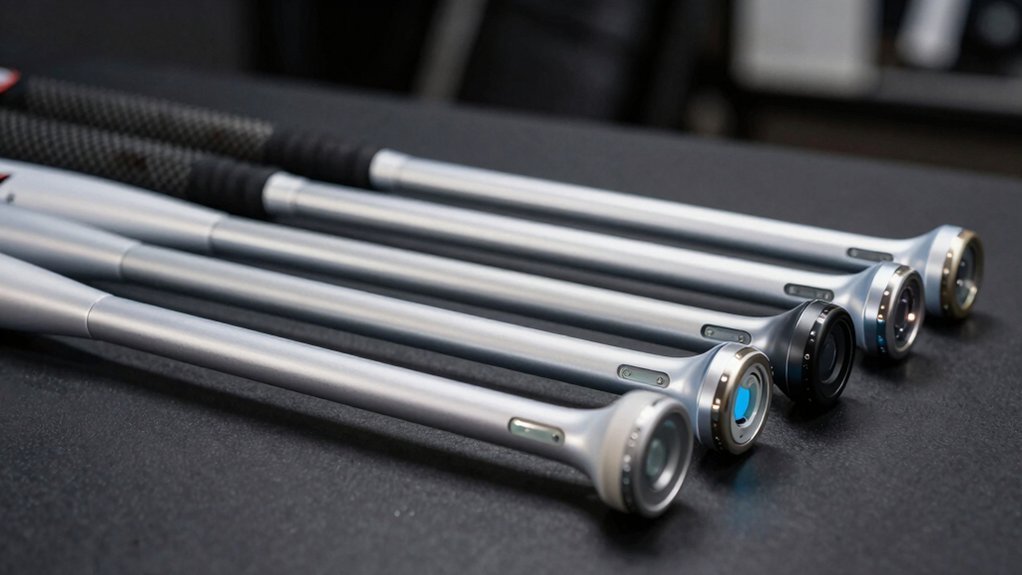
You’re investing in VR cricket, but your standard controllers aren’t cutting it. The difference between an immersive experience and frustrating gameplay often comes down to one thing: your attachment choice. With dozens of options flooding the market, you’ll want to know which ones actually deliver on performance, durability, and tracking accuracy. We’ve narrowed it down to seven standouts that’ll transform how you play.
| LITE Cricket Bat Grip for Meta Quest VR |  | Best For Portability | Compatible Meta Quest Headsets: Quest 3s/3, Quest Pro | Handle Length: 22 cm | Weight: 250 g (with Quest 3 controller) | CHECK ON AMAZON | Read Our Analysis |
| AMVR Gorilla Tag Controller Extensions for Meta Quest 3S | Most Versatile | Compatible Meta Quest Headsets: Quest 3s/3 | Handle Length: Varies by mode (Double Stick, Golf Club, Long Handle) | Weight: Not specified | CHECK ON AMAZON | Read Our Analysis | |
| Hibloks 3-in-1 Handle Attachments for Meta Quest 3/3S |  | Best For Comfort | Compatible Meta Quest Headsets: Quest 3/3s | Handle Length: 8.3 inches per handle | Weight: ~96 g per handle | CHECK ON AMAZON | Read Our Analysis |
| VR Cricket Bat Attachment for Meta Quest Headsets | 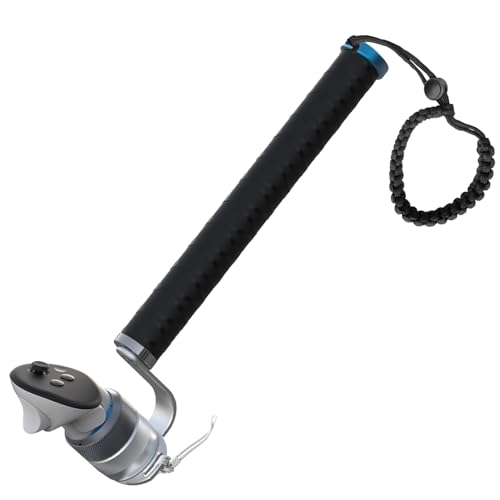 | Most Realistic Feel | Compatible Meta Quest Headsets: Quest 3/3s, Quest 2, Quest Pro | Handle Length: 29 cm | Weight: Up to 520 g (fully assembled) | CHECK ON AMAZON | Read Our Analysis |
| VR Baseball Bat Attachment for Meta Quest 2 | 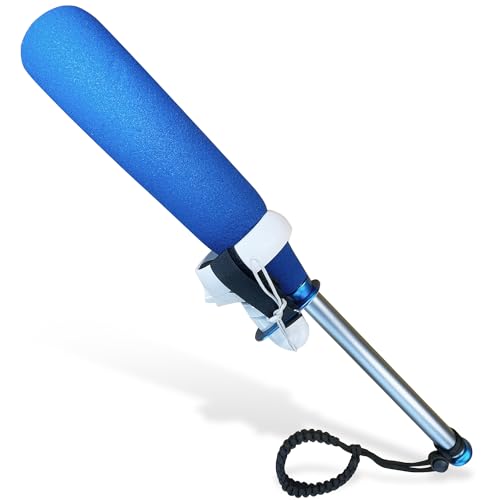 | Best For Beginners | Compatible Meta Quest Headsets: Quest 2/1, Rift S | Handle Length: 22 inches | Weight: Lightweight design | CHECK ON AMAZON | Read Our Analysis |
| VR Baseball Bat Attachment for Meta Quest 2 |  | Editor’s Choice | Compatible Meta Quest Headsets: Quest 2/1, Rift S | Handle Length: Not specified | Weight: 1.04 pounds | CHECK ON AMAZON | Read Our Analysis |
| VR Baseball Bat Attachment for Oculus Quest 2 |  | Best Overall | Compatible Meta Quest Headsets: Quest 2/1, Rift S | Handle Length: Not specified | Weight: 15.5 ounces | CHECK ON AMAZON | Read Our Analysis |
More Details on Our Top Picks
LITE Cricket Bat Grip for Meta Quest VR
Are you a cricket enthusiast ready to step into the virtual pitch? The LITE Cricket Bat Grip transforms your Meta Quest 3s/3 or Quest Pro experience with iB Cricket. This ambidextrous accessory weighs just 250 grams, delivering a comfortable, natural two-handed grip measuring 22 centimeters. You’ll appreciate the ultra-lightweight design that reduces fatigue during extended play sessions. Setup takes seconds—simply insert your right-hand controller using the quick-release system. Triple security features including wrist and Velcro straps keep everything locked down. Whether you’re left or right-handed, you’ll enjoy effortless controller removal and responsive gameplay that feels authentically immersive.
- Compatible Meta Quest Headsets:Quest 3s/3, Quest Pro
- Handle Length:22 cm
- Weight:250 g (with Quest 3 controller)
- Grip Material:Not specified
- Safety Features:Triple-secured, wrist strap, Velcro strap, compatible with controller strap
- Installation Method:Quick-release system, one-motion insertion/removal
- Additional Feature:Ambidextrous design for both hands
- Additional Feature:Triple-secured safety system
- Additional Feature:Quick-release controller insertion
AMVR Gorilla Tag Controller Extensions for Meta Quest 3S
If you’re seeking to extend your reach and precision in VR games like Gorilla Tag, Beat Saber, and Golf+, the AMVR Upgraded Gorilla Tag Long Arms Controller Extensions deliver the immersive gameplay you’re after. These Quest 3S-compatible extensions feature a 65-degree angle design that maintains stable signal transmission while their oval cross-section grip prevents tracking loss. You’ll appreciate the high-density sponge material that absorbs sweat and provides comfort during extended sessions. With three interchangeable modes—Double Stick, Golf Club, and Long Handle—they’re versatile across multiple titles. The durable ABS reinforced plastic shell ensures longevity, while 24/7 customer support backs your purchase.
- Compatible Meta Quest Headsets:Quest 3s/3
- Handle Length:Varies by mode (Double Stick, Golf Club, Long Handle)
- Weight:Not specified
- Grip Material:High-density sponge
- Safety Features:Protective ropes included
- Installation Method:Pre-drilled signal holes, controller insertion
- Additional Feature:Three interchangeable grip modes
- Additional Feature:65-degree angle signal stability
- Additional Feature:Pre-drilled signal hole design
Hibloks 3-in-1 Handle Attachments for Meta Quest 3/3S
You’ll want Hibloks attachments when you’re serious about enhancing your VR fitness gameplay. These 3-in-1 handles transform your Quest 3/3S controllers into specialized equipment for Beat Saber, Gorilla Tag, and sports simulations. The 8.3-inch extended handles feature full-wrap sponge coating that’s sweat-absorbent and non-slip, giving you superior grip control during intense sessions. You’ll appreciate the quick-lock design that secures your controllers firmly, while the upgraded ABS plastic ensures durability through rigorous workouts. Color-coded handles differentiate left from right for convenience. Double wrist ropes provide safety redundancy, and the 96-gram weight won’t fatigue your arms. You get everything needed: two handles, controller links, protective ropes, and an instruction manual. Customer support’s available 24/7 if you need assistance.
- Compatible Meta Quest Headsets:Quest 3/3s
- Handle Length:8.3 inches per handle
- Weight:~96 g per handle
- Grip Material:Full-wrap sponge coating, non-slip, sweat-absorbent
- Safety Features:Quick-lock design, double protection with wrist rope
- Installation Method:Quick-lock design with buckle
- Additional Feature:Color-coded left/right handles
- Additional Feature:8.3 inches expanded length
- Additional Feature:Improved VR fitness experience
VR Cricket Bat Attachment for Meta Quest Headsets
Meta Quest players seeking an authentic cricket experience won’t find a better solution than this aluminum bat attachment designed specifically for iB Cricket. The 29cm grip and 520g weight distribution give you realistic bat feel during intense swings. Installation’s straightforward—just lock your controller clockwise into the 90-degree cup, which maintains optimal tracking. The rubber grip prevents wobbling and scratches while keeping controller buttons accessible. You’ll appreciate the safety features: tie your controller lanyard to the metal mount and wear the wrist strap for double protection. Compatible with Quest 3/3S, Q2, and Q Pro, this attachment transforms your gameplay into genuinely immersive cricket action.
- Compatible Meta Quest Headsets:Quest 3/3s, Quest 2, Quest Pro
- Handle Length:29 cm
- Weight:Up to 520 g (fully assembled)
- Grip Material:Rubber controller cup
- Safety Features:Safe locking mechanism, tie controller lanyard, safety wrist strap
- Installation Method:Clockwise screw-thread lock, counterclockwise unlock
- Additional Feature:90-degree controller cup alignment
- Additional Feature:29 cm cricket grip length
- Additional Feature:Screw-thread lock mechanism
VR Baseball Bat Attachment for Meta Quest 2
Baseball enthusiasts seeking authentic swing training from home won’t find a better match than this VR Baseball Bat Attachment for Meta Quest 2. You’ll experience realistic pitches that sharpen your plate discipline and timing through WIN Reality, Totally Baseball, and iB Cricket. The 22-inch aluminum alloy grip delivers durability, while the oversized soft rubber foam barrel provides a premium feel. Its lightweight design enables balanced swings without fatigue. You’ll secure your left Oculus controller to the bat for proper alignment, and dual safety features—a reinforced strap and wrist strap—protect both your controllers and gameplay confidence. Optional grip tape lets you customize comfort for your playing style.
- Compatible Meta Quest Headsets:Quest 2/1, Rift S
- Handle Length:22 inches
- Weight:Lightweight design
- Grip Material:Aluminum alloy grip, oversized soft rubber foam barrel
- Safety Features:Reinforced strap, safety wrist strap
- Installation Method:Strap left controller to bat
- Additional Feature:Oversized soft rubber foam
- Additional Feature:22 inch bat length
- Additional Feature:Optional grip tape customizable
VR Baseball Bat Attachment for Meta Quest 2
How’d you like to train your swing without leaving home? The VR Baseball Bat Attachment for Meta Quest 2 delivers realistic baseball training through your headset. Its lightweight aluminum handle pairs with a soft rubber foam barrel for comfortable, powerful swings. You’ll strap your left controller to the bat and dive into compatible simulations like Totally Baseball, where you’ll refine plate discipline and timing against realistic pitches. The reinforced strap and safety wrist strap keep your controller secure during intense sessions. At just over a pound, this durable attachment balances authentically while demanding minimal setup—just ensure adequate swing space beforehand.
- Compatible Meta Quest Headsets:Quest 2/1, Rift S
- Handle Length:Not specified
- Weight:1.04 pounds
- Grip Material:Aluminum alloy grip, oversized soft rubber foam barrel
- Safety Features:Reinforced strap, safety wrist strap
- Installation Method:Strap left controller to bat
- Additional Feature:Realistic pitch training simulation
- Additional Feature:Left controller default positioning
- Additional Feature:Model Y31 specification details
VR Baseball Bat Attachment for Oculus Quest 2
Why settle for swinging at virtual pitches with just a controller when you can grip a realistic aluminum bat that’ll transform your home training sessions? YEZRO’s VR Baseball Bat Attachment delivers authentic feel and performance for your Oculus Quest 2. The lightweight aluminum handle features an oversized soft rubber foam barrel, letting you practice plate discipline and timing with genuine swing mechanics. Safety straps secure your controller while preventing the bat from flying off during intense gameplay. Compatible with WIN Reality, Totally Baseball, and iB Cricket, this 15.5-ounce accessory supports both right and left controllers. At just over seven inches long, it’s ergonomic and customizable with grip tape, making it an essential tool for serious VR baseball training.
- Compatible Meta Quest Headsets:Quest 2/1, Rift S
- Handle Length:Not specified
- Weight:15.5 ounces
- Grip Material:Aluminum alloy grip, oversized soft rubber foam barrel
- Safety Features:Reinforced strap, safety wrist strap
- Installation Method:Strap left controller to bat
- Additional Feature:Right or left controller support
- Additional Feature:7 x 2 x 2 inches compact
- Additional Feature:3.8 out of 5 rating
Factors to Consider When Choosing VR Cricket Bat Attachments
When you’re selecting a VR cricket bat attachment, you’ll need to evaluate several critical factors that directly impact your gameplay experience. Your choice hinges on compatibility with your headset, weight and balance distribution that matches your swing style, grip comfort and material quality, tracking signal stability to ensure accurate motion capture, and robust security and safety features that keep the attachment secure during intense play. Each of these elements works together to determine whether an attachment enhances or detracts from your immersive cricket experience.
Compatibility With Your Headset
Choosing the right VR cricket bat attachment starts with verifying it’ll work with your specific headset model. Meta Quest 3/3S, Quest Pro, Quest 2, and Rift S all have different mounting specifications, so you’ll need to confirm compatibility before purchasing.
Check whether your attachment supports your controller configuration—some are right-hand only while others are ambidextrous. You’ll also want to verify the mounting method aligns with your headset version, whether that’s clockwise locks, 90° cup orientation, or quick-lock designs.
Finally, review headset-specific limitations like signal tracking considerations and any pre-drilling requirements. Confirming these details ensures you’ll get a secure fit, reliable tracking accuracy, and consistent performance during your cricket sessions.
Weight and Balance Distribution
Once you’ve confirmed your attachment fits your headset, you’ll want to examine how weight and balance affect your gameplay. Most VR cricket bat attachments range around 520g, but lighter designs reduce fatigue during extended sessions. Weight distribution directly impacts your swing control—a well-balanced bat minimizes wrist strain and enhances accuracy indoors.
Pay attention to handle length and grip design. Longer handles shift the center of mass closer to your hands, improving maneuverability and reducing arm fatigue. The connection method matters too; clockwise locks, lanyards, and wrist straps all influence stability during dynamic movements.
Material composition affects feel significantly. Aluminum construction combined with padded sponge grips adds mass to specific sections, altering overall balance. Test different configurations to find what suits your swing style and endurance level best.
Grip Comfort and Materials
Your grip is where comfort meets control in VR cricket batting. You’ll find that full-wrap sponge coating on 3-in-1 handles delivers non-slip, sweat-absorbent comfort during intense gameplay. The material feel directly impacts your performance, so prioritize handles designed for extended sessions.
Weight matters too—lighter handles around 96 grams reduce fatigue, while heavier bat assemblies up to 520 grams offer different swing dynamics. You should consider oval cross-sections and 65-degree angle extensions that maintain stable tracking and minimize slippage.
Don’t overlook compatibility with controller straps, which enhance security and reduce hand strain during prolonged play. Optional grip tape lets you customize thickness and feel to match your preferences perfectly, ensuring your setup aligns with your unique playing style.
Tracking Signal Stability
How does a VR cricket bat maintain precise tracking when you’re executing rapid swings? The answer lies in strategic signal stability features. You’ll want attachments with 90° design elements that keep surface signal points oriented toward your headset throughout gameplay. Extensions featuring pre-drilled signal holes and oval cross-sections prevent tracking loss during dynamic movements. ABS reinforced shells ensure stable transmission between your controller and headset, eliminating signal degradation. Upgraded long-arm designs align signals from both extensions simultaneously, enhancing accuracy during complex shots. Quick-lock or screw-thread mechanisms minimize wobble, delivering consistent tracking precision when you need it most. These stabilization features work together, transforming your VR cricket experience from frustrating to fluid.
Security and Safety Features
While tracking stability keeps your virtual bat aligned with your physical movements, protecting your equipment and hands requires equally thoughtful design. You’ll want a reinforced strap system that secures your controller firmly, preventing it from flying loose during vigorous swings.
Look for dual protection measures like wrist straps and lanyards that safeguard your controller from accidental damage and loss. Many quality attachments feature 90-degree controller cups or protective rubber cups that minimize wobble while reducing surface wear.
Installation matters too. Quick-lock or screw-thread systems ensure your bat stays stable during active play, giving you confidence in every swing. These security features transform your experience from stressful to enjoyable, letting you focus entirely on your game without worrying about equipment failure or injury.
Frequently Asked Questions
Are VR Cricket Bat Attachments Compatible With Playstation VR2 or Only Meta Quest?
You’ll find that most VR cricket bat attachments work with both PlayStation VR2 and Meta Quest platforms, though you should verify specific compatibility before purchasing. Some attachments are platform-exclusive, so check product specifications carefully.
How Do VR Bat Attachments Improve Gameplay Accuracy Compared to Standard Controllers?
You’ll experience improved accuracy because bat attachments give you precise swing tracking and natural grip positioning. They eliminate controller drift, enhance your shot consistency, and let you replicate authentic cricket movements more effectively than standard controllers allow.
What Is the Typical Battery Life for Wireless VR Cricket Bat Attachments?
You’ll typically get 8-12 hours of battery life from wireless VR cricket bat attachments, though premium models can reach 15+ hours. You should charge them nightly for consistent performance during your gaming sessions.
Can VR Cricket Bat Attachments Be Used for Sports Games Other Than Cricket?
You can adapt VR cricket bat attachments for baseball, softball, and tennis games. Most attachments work with any VR sport title supporting bat controllers. You’ll need compatible software and may require calibration adjustments for optimal performance.
Do VR Bat Attachments Require Calibration Before First Use With New Games?
Yes, you’ll need to calibrate your VR bat attachments before first use with new games. You’ll typically access calibration settings in each game’s menu, adjust sensitivity levels, and perform swing tests to ensure accurate hit detection and responsive gameplay.



