
You’re investing serious money into your flight sim setup, so you’d better get the controls right. Whether you’re flying Airbus or Boeing, you’ll want precision that won’t quit after a few hundred hours. The difference between a mediocre setup and one that’ll transform your cockpit experience comes down to knowing which systems actually deliver. Here’s what separates the gear that pros rely on from the rest.
| Logitech G PRO Flight Yoke System Professional Simulator |  | Best Overall | Control Type: Yoke and throttle quadrant | Programmable Controls: 54+ programmable controls | Platform Compatibility: Windows 7/8/8.1/10/11 (PC only) | CHECK ON AMAZON | Read Our Analysis |
| Turtle Beach VelocityOne Flight Universal Control System |  | Most Versatile | Control Type: Yoke, throttle, trim wheel, rudder | Programmable Controls: 12 analog axes, 2 POV switches, 2 HAT switches | Platform Compatibility: Xbox Series X|S, Xbox One, Windows 10/11 | CHECK ON AMAZON | Read Our Analysis |
| Thrustmaster T-Flight Hotas One Flight Sim Controller |  | Best for Xbox | Control Type: Joystick and detachable throttle | Programmable Controls: 14 buttons, 1 rapid trigger | Platform Compatibility: Xbox Series X|S, PC | CHECK ON AMAZON | Read Our Analysis |
| Logitech G X56 H.O.T.A.S Flight Simulator Controller | 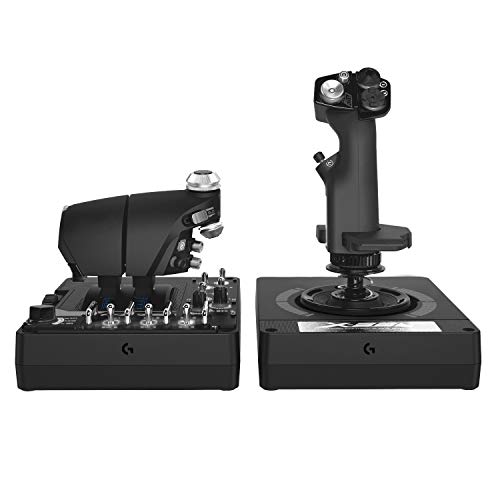 | Professional Grade | Control Type: Joystick and dual throttles (HOTAS) | Programmable Controls: 189+ programmable controls | Platform Compatibility: Windows 7/8/8.1/10/11 (PC only) | CHECK ON AMAZON | Read Our Analysis |
| Logitech G Pro Flight Yoke System + Pro Flight Rudder Pedals Bundle |  | Best Bundle | Control Type: Yoke, throttle, and rudder pedals | Programmable Controls: 54+ programmable controls | Platform Compatibility: Windows 7/8/8.1/10 (PC only) | CHECK ON AMAZON | Read Our Analysis |
| Logitech G Pro Flight Rudder Pedals |  | Budget-Friendly Pick | Control Type: Rudder pedals only | Programmable Controls: Rudder and toe brake axes only | Platform Compatibility: Windows 7/8/8.1/10 (PC only) | CHECK ON AMAZON | Read Our Analysis |
| Thrustmaster T16000M FCS Flight Pack (Compatible with PC) |  | Best Value | Control Type: Joystick and throttle (HOTAS) | Programmable Controls: 16 action buttons, 8-way POV hat | Platform Compatibility: Windows 32/64-bit (PC only) | CHECK ON AMAZON | Read Our Analysis |
| Thrustmaster T-Flight Hotas X (Compatible with PC) |  | Best for Beginners | Control Type: Joystick and detachable throttle | Programmable Controls: 12 buttons, 5 axes (fully programmable) | Platform Compatibility: Windows (PC only) | CHECK ON AMAZON | Read Our Analysis |
| Thrustmaster TCA Captain Pack Airbus Edition |  | Most Realistic | Control Type: Sidestick and throttle quadrant | Programmable Controls: 31 Airbus replica buttons, 14 remappable buttons | Platform Compatibility: Xbox Series X|S, PC | CHECK ON AMAZON | Read Our Analysis |
| Logitech G X52 Flight Control System – Standard Packaging | 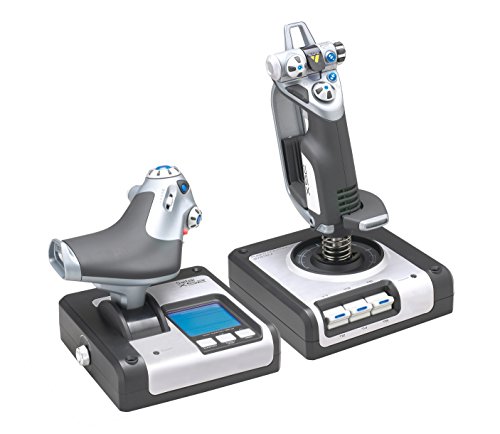 | Best Display Features | Control Type: Joystick and progressive throttle | Programmable Controls: 2 fire buttons, 2 rotary dials with buttons | Platform Compatibility: Windows XP/Vista/7/8.1/10+ (PC only) | CHECK ON AMAZON | Read Our Analysis |
More Details on Our Top Picks
Logitech G PRO Flight Yoke System Professional Simulator
Are you seeking a professional-grade flight control system that doesn’t require a complete cockpit setup? The Logitech G PRO Flight Yoke System delivers authentic simulation with its stainless steel shaft and 75 programmable controls across three operational modes. You’ll get a realistic yoke with 14 buttons, a POV hat, and a throttle quadrant featuring configurable knobs. The dual desk clamps secure everything firmly to your setup. Compatible with Windows 7 through 11, it works seamlessly with Microsoft Flight Simulator, FSX, X-Plane 10, and Prepar3D. Whether you’re building muscle memory or refining your skills, this system provides the precision control serious pilots demand.
- Control Type:Yoke and throttle quadrant
- Programmable Controls:54+ programmable controls
- Platform Compatibility:Windows 7/8/8.1/10/11 (PC only)
- Precision Technology:Stainless steel yoke shaft
- Mounting/Stability:2 desk clamps
- Software/Customization:Optional software download for flight sims
- Additional Feature:Stainless steel yoke shaft
- Additional Feature:3-position mode switch
- Additional Feature:POV hat control
Turtle Beach VelocityOne Flight Universal Control System
If you’re seeking a all-encompassing flight control setup that works seamlessly across Xbox and PC platforms, the Turtle Beach VelocityOne Flight Universal Control System delivers everything you’ll need in one integrated package. You’ll get a 180° yoke with hall effect sensors, a customizable modular throttle quadrant, and dedicated rudder controls within arm’s reach. The pitch trim wheel provides precise aircraft adjustments, while the full-color flight management display lets you configure settings intuitively. With twelve analog axes, multiple HAT switches, and a secure clamping system, you’re equipped for Microsoft Flight Simulator 2024 and compatible Xbox titles. This all-in-one solution eliminates cable clutter and compatibility headaches.
- Control Type:Yoke, throttle, trim wheel, rudder
- Programmable Controls:12 analog axes, 2 POV switches, 2 HAT switches
- Platform Compatibility:Xbox Series X|S, Xbox One, Windows 10/11
- Precision Technology:Non-contact hall effect sensor (yoke)
- Mounting/Stability:Secure clamping system
- Software/Customization:Full color flight management display
- Additional Feature:180° yoke handle rotation
- Additional Feature:Full color flight display
- Additional Feature:Integrated rudder controls
Thrustmaster T-Flight Hotas One Flight Sim Controller
For gamers who want an officially licensed, console-compatible setup without breaking the bank, the Thrustmaster T-Flight Hotas One Microsoft Flight Simulator 2024 Collectors Edition delivers serious precision. You’ll get 10-bit accuracy across five axes, fourteen programmable buttons, and a rapid trigger for responsive control. The detachable throttle lets you customize your setup for lap or desk use. You can choose between Z-axis joystick or tilting throttle lever for rudder control, giving you flexibility in how you fly. Its ergonomic design and adjustable joystick resistance mean you’ll handle everything from commercial jets to fighter aircraft with ease. For console flyers seeking professional-grade control, this is your answer.
- Control Type:Joystick and detachable throttle
- Programmable Controls:14 buttons, 1 rapid trigger
- Platform Compatibility:Xbox Series X|S, PC
- Precision Technology:10-bit precision, 5 axes
- Mounting/Stability:Detachable throttle for lap/desk use
- Software/Customization:Official Microsoft Flight Simulator license
- Additional Feature:Detachable throttle design
- Additional Feature:Dual rudder system
- Additional Feature:Official Microsoft licensing
Logitech G X56 H.O.T.A.S Flight Simulator Controller
The Logitech G X56 H.O.T.A.S stands out as the premier choice if you’re seeking military-grade precision combined with extensive customization. You’ll command +189 programmable controls across the throttle and joystick, allowing you to tailor every function to your flying style. The advanced 4-spring system lets you adjust stick force precisely, while hall-effect sensors deliver accurate 16-bit aileron and elevator input. Mini analog sticks grant you independent weapon control, and the twin throttles feature friction adjustment and throttle lock for realistic operation. RGB backlighting syncs with your setup, and the ergonomic design positions controls perfectly under your fingers for VR immersion. Two USB ports and 2-meter cable ensure seamless PC connectivity.
- Control Type:Joystick and dual throttles (HOTAS)
- Programmable Controls:189+ programmable controls
- Platform Compatibility:Windows 7/8/8.1/10/11 (PC only)
- Precision Technology:16-bit aileron/elevator with hall-effect sensors
- Mounting/Stability:Twin throttles with friction adjuster
- Software/Customization:RGB backlighting, software customization
- Additional Feature:189 programmable controls
- Additional Feature:RGB backlighting customization
- Additional Feature:4 spring options
Logitech G Pro Flight Yoke System + Pro Flight Rudder Pedals Bundle
Want a control setup that’ll grow with your piloting skills? The Logitech G Pro Flight Yoke System paired with Pro Flight Rudder Pedals delivers realistic aircraft handling without breaking the bank. You’ll get a genuine yoke design with 54+ programmable controls, including a POV hat and 14 buttons for comprehensive cockpit management. The self-centering rudder pedals feature differential toe brakes, giving you precise runway control. Adjustable foot rests accommodate various sizes, while non-slip materials ensure stability during intense sessions. Whether you’re building muscle memory as a beginner or enhancing your experience as a veteran pilot, this bundle transforms your flight simulation setup into a legitimate training tool.
- Control Type:Yoke, throttle, and rudder pedals
- Programmable Controls:54+ programmable controls
- Platform Compatibility:Windows 7/8/8.1/10 (PC only)
- Precision Technology:Self-centering rudder pedals
- Mounting/Stability:Includes rudder pedal foot rests
- Software/Customization:Optional software download
- Additional Feature:Differential toe brakes
- Additional Feature:Self-centering rudder pedals
- Additional Feature:Adjustable foot rests
Logitech G Pro Flight Rudder Pedals
Are you seeking rudder pedals that’ll deliver authentic aircraft control without breaking your budget? The Logitech G Pro Flight Rudder Pedals offer smooth, accurate self-centering action with an adjustable tension dial that lets you customize the feel from light to robust. You’ll get differential toe brakes for realistic runway operations and full aircraft control. These pedals feature a 9-bit rudder axis and 7-bit toe brake axis, ensuring precise inputs. Compatible with Windows 7 through 10 via USB 2.0, they’re compact at 31 x 41 x 17 cm and weigh just 2.3 kg. They’re an excellent standalone choice or perfect complement to your existing flight sim setup.
- Control Type:Rudder pedals only
- Programmable Controls:Rudder and toe brake axes only
- Platform Compatibility:Windows 7/8/8.1/10 (PC only)
- Precision Technology:9-bit rudder axis, 7-bit toe brake axis
- Mounting/Stability:Adjustable foot rests, non-slip pedals
- Software/Customization:Optional software download
- Additional Feature:Adjustable tension dial
- Additional Feature:Differential toe brakes
- Additional Feature:Self-centering pedal design
Thrustmaster T16000M FCS Flight Pack (Compatible with PC)
Looking for a joystick that adapts to you rather than forcing you to adapt to it? The Thrustmaster T16000M FCS Flight Pack delivers exactly that. Its fully ambidextrous design with three removable components lets you configure it for left or right-handed flying. You’ll appreciate the H.E.A.R.T technology, which maintains precision stability over years of use. The joystick features 16 programmable buttons with tactile identification, an 8-way hat switch, and four independent axes including twist rudder control. T.A.R.G.E.T software lets you create custom profiles for each flight sim. USB-compatible with Windows, this pack gives you professional-grade control without compromise.
- Control Type:Joystick and throttle (HOTAS)
- Programmable Controls:16 action buttons, 8-way POV hat
- Platform Compatibility:Windows 32/64-bit (PC only)
- Precision Technology:H.E.A.R.T technology for stability
- Mounting/Stability:No mounting details provided
- Software/Customization:T.A.R.G.E.T software for mapping profiles
- Additional Feature:H.E.A.R.T stability technology
- Additional Feature:Fully ambidextrous joystick
- Additional Feature:3 removable components
Thrustmaster T-Flight Hotas X (Compatible with PC)
If you’re seeking a flight control system that delivers professional-grade precision without the premium price tag, the Thrustmaster T-Flight Hotas X stands out as an exceptional choice for PC-based flight simulation. You’ll appreciate its detachable, ergonomically-designed throttle and weighted base that keeps everything stable during intense maneuvers. The high-precision joystick features adjustable resistance, while dual-system aerodynamic control lets you rotate the handle or use the progressive tilting lever. With twelve programmable buttons and five customizable axles, you’ve got complete control over your setup. The exclusive preset button lets you instantly switch between programmed configurations mid-flight. Thanks to plug-and-play installation with pre-configured functions, you’re ready for takeoff immediately.
- Control Type:Joystick and detachable throttle
- Programmable Controls:12 buttons, 5 axes (fully programmable)
- Platform Compatibility:Windows (PC only)
- Precision Technology:High-precision joystick with adjustable resistance
- Mounting/Stability:Weighted base for stability
- Software/Customization:Plug & Play with pre-configured profiles
- Additional Feature:Detachable throttle control
- Additional Feature:Internal memory storage
- Additional Feature:Weighted base stability
Thrustmaster TCA Captain Pack Airbus Edition
Serious flight sim enthusiasts who demand authentic Airbus controls won’t find a more faithful replica than Thrustmaster’s TCA Captain Pack Airbus Edition. You’ll appreciate the 1:1 scale sidestick and throttle quadrant designed specifically for the A320/A320neo. The enhanced throttle features a built-in thrust reverser mechanism, while rotating the sidestick handle controls your rudder. You get 31 remappable action buttons across the devices, including iconic Airbus controls like trim, landing gear, and autobrake. With official Xbox Series X|S and Airbus licensing, plus seamless PC compatibility, you’re investing in a simulation reference that delivers uncompromising immersion and tactile realism.
- Control Type:Sidestick and throttle quadrant
- Programmable Controls:31 Airbus replica buttons, 14 remappable buttons
- Platform Compatibility:Xbox Series X|S, PC
- Precision Technology:1:1 scale Airbus replica design
- Mounting/Stability:Redesigned base for improved stability
- Software/Customization:Software support for TCA ecosystem
- Additional Feature:Airbus licensed 1:1 scale
- Additional Feature:Built-in thrust reverser
- Additional Feature:4 swappable joystick modules
Logitech G X52 Flight Control System – Standard Packaging
The Logitech G X52 Flight Control System delivers professional-grade precision for flight enthusiasts who demand authentic cockpit control. You’ll appreciate the advanced multi-function display that mimics real aircraft interfaces, paired with two dedicated MFD buttons and rotary dials for intuitive gameplay. The joystick features non-contact X and Y axis technology with a precision centering mechanism, ensuring responsive handling. Its progressive throttle includes tension adjustment and detents for afterburner and idle positions. With two fire buttons and constant spring force feedback, you get realistic combat capabilities. The system’s compatibility spans Windows XP through Windows 10 and newer, making it accessible across platforms.
- Control Type:Joystick and progressive throttle
- Programmable Controls:2 fire buttons, 2 rotary dials with buttons
- Platform Compatibility:Windows XP/Vista/7/8.1/10+ (PC only)
- Precision Technology:Non-contact technology on X/Y axes
- Mounting/Stability:Weighted bases on joystick and throttle
- Software/Customization:Advanced multi-function display (MFD)
- Additional Feature:Advanced multi-function display
- Additional Feature:Non-contact hall effect
- Additional Feature:Progressive throttle tension
Factors to Consider When Choosing Flight Simulator Controls
When you’re selecting flight simulator controls, you’ll need to evaluate compatibility with your platform, the precision and realism each system offers, and what customization options suit your flying style. Your physical space and ergonomic comfort matter substantially—you don’t want a setup that causes fatigue during long sessions. Finally, you’ll want to balance the features and build quality against your budget to find the best value for your investment.
Compatibility and Platform Support
How’ll you know if your chosen flight sim controls’ll actually work with your setup? First, verify Windows compatibility—you’ll need Windows 10 or 11 for most modern controls. Check whether you’re using Microsoft Flight Simulator, X-Plane, or Prepar3D, as support varies by title.
Next, confirm connection requirements. Most controls use USB 2.0, though some demand multiple ports or PS2 connections. Review your PC’s available interfaces before purchasing.
Consider your ecosystem carefully. PC-only devices won’t function on Xbox Series X|S, limiting flexibility if you plan cross-platform gaming. Finally, examine sensor technology—hall-effect sensors offer superior durability and precision compared to potentiometer-based alternatives, especially for long-term use in demanding flight simulations.
Control Precision and Realism
What separates a mediocre flight sim experience from an immersive one? Control precision and realism. You’ll want controls with higher-resolution sensors—12-bit or 16-bit axes—that give you finer input control. Hall effect sensors eliminate the wear and inconsistency of mechanical potentiometers, delivering smoother feedback over time.
Consider yokes offering full 180° rotation and twist rudder inputs that mirror actual aircraft handling. Adjustable detents, spring settings, and resistance options let you fine-tune tactile feedback for your preferences and specific aircraft.
Dedicated trim, throttle, and rudder controls matter too. They enable precise, repeatable adjustments across different flight models. Programmable profiles allow you to save configurations for various scenarios, ensuring consistent performance whether you’re practicing carrier landings or cross-country flights.
Programmability and Customization Options
Your flight sim experience thrives when controls adapt to your specific needs rather than forcing you into predetermined patterns. You’ll find that premium setups offer 54+ programmable controls across multiple modes, letting you customize functions like flaps, rudder, and trims to match your workflow. Many yokes and throttles include dedicated mode switches for quick profile changes mid-flight. Software mapping tools like T.A.R.G.E.T empower you to tailor control schemes per aircraft or simulator. Higher-end bundles combine yokes, pedals, and throttles into cohesive systems, enabling fully customized control decks. When evaluating options, prioritize setups offering remappable buttons and axes—they’re essential for building control configurations that genuinely reflect how you fly.
Physical Setup and Ergonomics
Since you’ll spend hours gripping a yoke and working pedals, the physical foundation of your setup deserves as much attention as the controls themselves. You’ll need secure mounting solutions like desk clamps or sturdy bases to eliminate unwanted movement across varied desk configurations.
Your controls should position buttons and switches within arm’s reach, reducing fatigue during extended sessions. Prioritize non-slip pedals and supportive footrests that stabilize your lower body during intense maneuvers.
Adjustable resistance and tension systems let you customize feel to match specific aircraft types and your personal preferences. Self-centering rudders and tilting throttles enhance precision during critical operations like takeoffs and landings.
Finally, seek ambidextrous or customizable grip options that accommodate different hand sizes and seating positions, minimizing strain and maximizing comfort.
Budget and Value Proposition**
How much should you actually spend on flight simulator controls? You’ll find that higher upfront costs typically deliver superior durability, programmability, and tactile feedback—factors that serious pilots value over time. Bundle deals combining yokes and rudder pedals often provide better overall value than purchasing components separately, minimizing compatibility headaches.
Consider systems offering 54+ programmable controls that streamline your setup and reduce per-session configuration time. Hardware featuring self-centering rudder pedals with adjustable tension and 9-bit axes creates more realistic control inputs. Multi-axis precision sensors using hall-effect technology maintain accuracy longer, potentially lowering replacement costs.
For dedicated enthusiasts, these investments justify their price through improved long-term value and reduced equipment turnover. You’re not just buying controls—you’re investing in consistency and realism.
Frequently Asked Questions
What’s the Average Lifespan of Flight Simulator Control Equipment Before Replacement?
You’ll typically replace flight simulator controls every 3-5 years with regular use. Heavy users might need replacements sooner, while casual enthusiasts can stretch equipment to 7-10 years. Wear on joysticks and throttles determines actual lifespan.
Can I Use Console Flight Controls on PC Flight Simulators and Vice Versa?
You can use some console flight controls on PC simulators through adapters, but you’ll face compatibility issues. Most PC simulators don’t support console controllers directly. You’re better off purchasing controls designed specifically for your platform.
Which Controls Offer the Best Value for Casual Hobbyist Pilots on Budget?
You’ll find entry-level joysticks like the Logitech Extreme 3D Pro offer exceptional value for casual hobbyists. They’re affordable, reliable, and compatible with most PC flight simulators. You won’t need expensive gear to enjoy realistic flying experiences.
How Do I Properly Calibrate and Maintain My Flight Simulator Controls?
You’ll calibrate your controls through your simulator’s settings menu, mapping each axis and button precisely. You should clean them regularly with compressed air, check for drift periodically, and tighten any loose components to maintain optimal performance.
Are Wireless Flight Simulator Controls Reliable Enough for Serious Training Purposes?
You’ll find wireless controls adequate for casual training, but you’d better stick with wired options if you’re pursuing serious pilot certification. Wired setups eliminate latency issues that could compromise your muscle memory development.



