
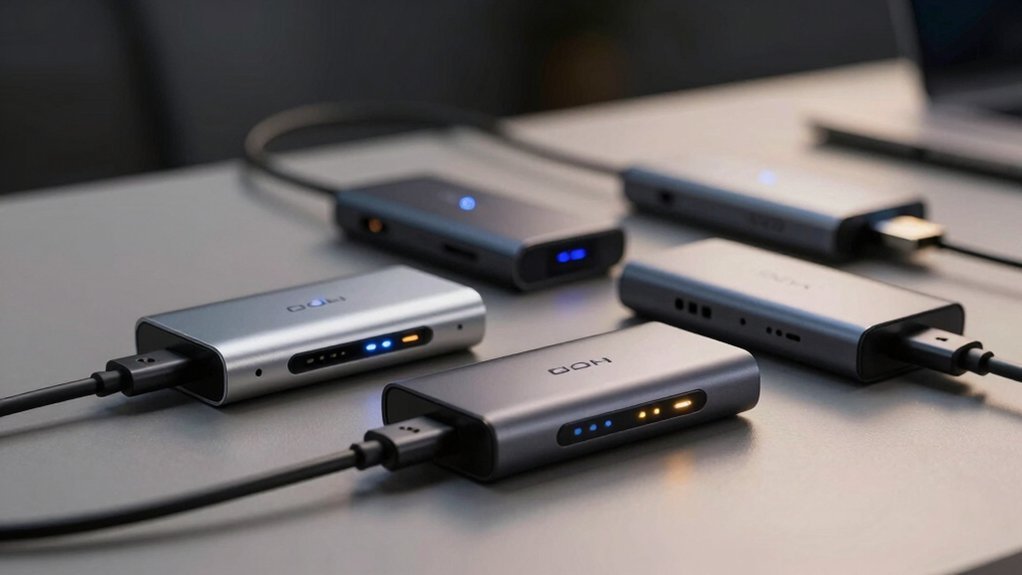
You’re investing in VR hardware, but your setup’s a mess—tangled cables, dropped connections, and trackers fighting for USB ports. You’ve got options, though. Whether you’re running a Vive ecosystem, a Quest headset, or a PS4 VR rig, the right hub transforms your entire experience. Let’s explore which models actually deliver what VR enthusiasts demand in 2026.
| Rebuff Reality USB Hub 4-Port for Vive Tracker |  | VR Tracker Specialist | Primary Use Case: VR tracker dongle management | Number of Ports: 4 ports | Data Transfer Speed: High-speed (5 Gbps capable) | CHECK ON AMAZON | Read Our Analysis |
| 7-Port USB 3.0 Hub with RGB Lighting |  | RGB Gaming Essential | Primary Use Case: General PC/console port expansion | Number of Ports: 7 ports | Data Transfer Speed: USB 3.0 (5 Gbps) | CHECK ON AMAZON | Read Our Analysis |
| Skywin PS4 VR Charging Station Stand with Controller Charger |  | PS4 All-in-One | Primary Use Case: PS4 VR charging and storage station | Number of Ports: 4 USB ports (plus charging station) | Data Transfer Speed: USB hub integrated (PS4-powered) | CHECK ON AMAZON | Read Our Analysis |
| Rebuff Reality 4 Port USB 3.0 Hub for Gaming | 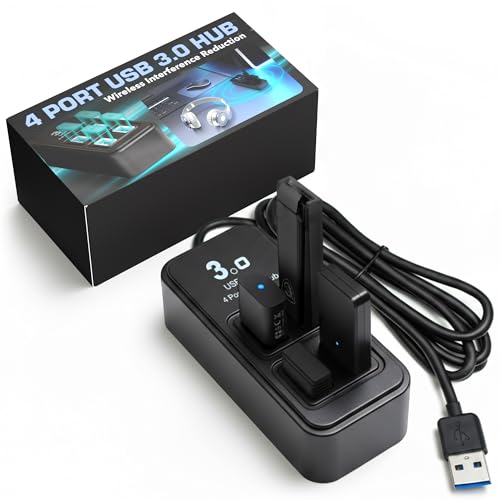 | Gaming Interference Shield | Primary Use Case: Gaming wireless peripheral stability | Number of Ports: 4 ports | Data Transfer Speed: USB 3.0 (5 Gbps) | CHECK ON AMAZON | Read Our Analysis |
| Rebuff Reality 7 Port USB 3.0 Hub for Gaming |  | Ultimate Gaming Hub | Primary Use Case: Gaming/VR full-body tracking | Number of Ports: 7 ports | Data Transfer Speed: USB 3.0 (5 Gbps) | CHECK ON AMAZON | Read Our Analysis |
| Atolla Aluminum 7-Port USB 3.0 Hub with Extension Cable |  | Portable Professional Choice | Primary Use Case: Portable data transfer and charging | Number of Ports: 7 ports | Data Transfer Speed: USB 3.0 (5 Gbps) | CHECK ON AMAZON | Read Our Analysis |
| Upgraded VR Wireless USB Dongle Receiver for Valve Index |  | VR Dongle Receiver | Primary Use Case: VR wireless dongle receiver | Number of Ports: 2 dongles (dual-pack) | Data Transfer Speed: VR dongle protocol | CHECK ON AMAZON | Read Our Analysis |
| Upgraded 4-Port USB Hub for Vive Tracker |  | Vive Tracker Expert | Primary Use Case: VR tracker dongle management | Number of Ports: 4 ports + 1 USB-C power port | Data Transfer Speed: USB 3.0 (5 Gbps) | CHECK ON AMAZON | Read Our Analysis |
| Syntech Link Cable 16FT for PCVR Headsets |  | Premium Link Cable | Primary Use Case: PC VR headset link cable connection | Number of Ports: Single cable connection (16 ft) | Data Transfer Speed: USB 3.0 (practical 2-3 Gbps) | CHECK ON AMAZON | Read Our Analysis |
| TNP 5 Port USB Hub for PS4 |  | PS4 Standard Expander | Primary Use Case: PS4 peripheral expansion | Number of Ports: 5 ports (1 USB 3.0 + 4 USB 2.0) | Data Transfer Speed: USB 3.0/2.0 mixed | CHECK ON AMAZON | Read Our Analysis |
| USB 2.0 Splitter Y Adapter Cable (0.8Ft) |  | Budget Splitter Solution | Primary Use Case: USB device splitting | Number of Ports: 3 ports (Y-splitter) | Data Transfer Speed: USB 2.0 (480 Mbps) | CHECK ON AMAZON | Read Our Analysis |
| USB Hub for PS4Slim Gaming Console USB Extender Splitter Extra USB Ports |  | PS4 Slim Matcher | Primary Use Case: PS4 Slim peripheral expansion | Number of Ports: 5 ports (1 USB 3.0 + 4 USB 2.0) | Data Transfer Speed: USB 3.0/2.0 mixed | CHECK ON AMAZON | Read Our Analysis |
| USB-C AR Glasses Power and Play Adapter |  | AR Glasses Adapter | Primary Use Case: AR/XR glasses power and charging | Number of Ports: 2 ports (USB-C adapter) | Data Transfer Speed: USB-C PD charging | CHECK ON AMAZON | Read Our Analysis |
| JoyReken 7-Port USB 3.0 Hub with RGB Light (Hot Pink) | 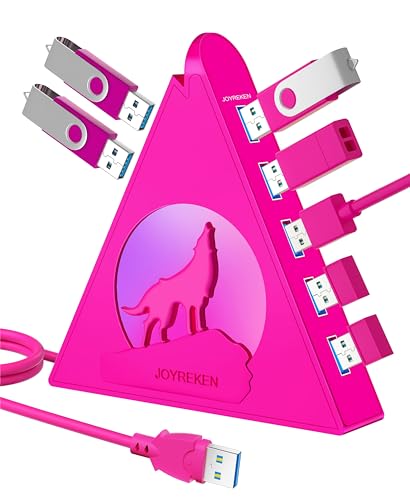 | Aesthetic RGB Hub | Primary Use Case: Gaming workstation port expansion | Number of Ports: 7 ports | Data Transfer Speed: USB 3.0 (5 Gbps) | CHECK ON AMAZON | Read Our Analysis |
| AMVR RGB Charging Dock for Meta Quest 3/3S |  | Quest Fast Charger | Primary Use Case: Meta Quest charging and connectivity | Number of Ports: 1 USB 3.0 port (on dock) | Data Transfer Speed: USB 3.0 (5 Gbps) | CHECK ON AMAZON | Read Our Analysis |
More Details on Our Top Picks
Rebuff Reality USB Hub 4-Port for Vive Tracker
Are you drowning in a tangle of VR dongles? The Rebuff Reality 4-Port USB Hub solves that problem elegantly. This hub organizes up to four Vive Tracker dongles in an upright design that prevents interference and reduces clutter. You’ll get high-speed data transfer that maintains stable connections during intense VR sessions and motion capture work. Compatible with Vive Tracker 3.0, 2.0, and other VR peripherals, it features premium construction in a compact package. The four-foot cable gives you flexible placement options, while its official VIVE-ready integration ensures seamless compatibility with your existing setup.
- Primary Use Case:VR tracker dongle management
- Number of Ports:4 ports
- Data Transfer Speed:High-speed (5 Gbps capable)
- Design/Form Factor:Upright dongle organizer
- VR/Gaming Optimization:Full-body VR tracking support
- Cable/Connectivity Length:4 ft cable
- Additional Feature:Organizes up to 4 dongles
- Additional Feature:Upright design prevents interference
- Additional Feature:4 ft cable reach
7-Port USB 3.0 Hub with RGB Lighting
If you’re juggling multiple VR peripherals—headsets, controllers, sensors, and accessories—the 7-Port USB 3.0 Hub with RGB Lighting expands your single USB port into seven dedicated connections, eliminating the frustration of constant device swapping. You’ll transfer data at 5Gbps, ten times faster than USB 2.0, making it ideal for backing up large VR project files and HD footage. The vertical design maximizes desk space while the RGB lighting cycles through seven colors, adding aesthetic appeal to your setup. A USB-C port provides stable power, and included adhesive keeps everything organized. You’re backed by a 12-month warranty and responsive customer support.
- Primary Use Case:General PC/console port expansion
- Number of Ports:7 ports
- Data Transfer Speed:USB 3.0 (5 Gbps)
- Design/Form Factor:Vertical hub with RGB wolf lighting
- VR/Gaming Optimization:RGB lighting aesthetic
- Cable/Connectivity Length:Desk-mounted placement
- Additional Feature:RGB lighting with color cycles
- Additional Feature:Wolf-head lighting design
- Additional Feature:Includes double-sided adhesive
Skywin PS4 VR Charging Station Stand with Controller Charger
How much desk real estate are you willing to sacrifice for cable clutter? The Skywin PS4 VR Charging Station consolidates your entire setup into one organized hub. You’ll charge two controllers simultaneously while storing up to eleven game discs vertically. The integrated cooling fan keeps your PS4 family console running optimally, and you’ll gain four additional USB ports powered directly from your console. This all-in-one stand eliminates external adapters and scattered cables, freeing precious space. Whether you’re running PSVR V1 or V2, you’re getting a streamlined solution that VR enthusiasts appreciate for its efficiency and functionality.
- Primary Use Case:PS4 VR charging and storage station
- Number of Ports:4 USB ports (plus charging station)
- Data Transfer Speed:USB hub integrated (PS4-powered)
- Design/Form Factor:Vertical stand with cooling fan
- VR/Gaming Optimization:PSVR-specific charging/organization
- Cable/Connectivity Length:Vertical console stand (no cable)
- Additional Feature:Built-in game disc rack
- Additional Feature:Dual controller charging capability
- Additional Feature:Integrated cooling fan
Rebuff Reality 4 Port USB 3.0 Hub for Gaming
Rebuff Reality’s 4 Port USB 3.0 Hub is engineered specifically for VR enthusiasts who can’t afford wireless lag during competitive play or full-body tracking sessions. You’ll eliminate wireless interference that plagues gaming setups, ensuring your mouse, keyboard, and headset perform without stuttering. The hub’s four USB 3.0 ports deliver up to 5 Gbps data transfer, handling high-bandwidth devices like Tundra trackers and VRChat rigs effortlessly. Its weighted base keeps everything stable on your desk, while wide-spaced ports shield peripherals from USB 3.0 noise. Plug-and-play compatible with Windows and Mac, this compact hub maintains signal integrity so you’re never caught off-guard during critical moments.
- Primary Use Case:Gaming wireless peripheral stability
- Number of Ports:4 ports
- Data Transfer Speed:USB 3.0 (5 Gbps)
- Design/Form Factor:Upright with weighted base
- VR/Gaming Optimization:Wireless interference reduction
- Cable/Connectivity Length:Desktop placement
- Additional Feature:Weighted non-slip base
- Additional Feature:Reduces wireless interference/lag
- Additional Feature:Upright wide-spaced ports
Rebuff Reality 7 Port USB 3.0 Hub for Gaming
For VR enthusiasts running full-body tracking setups or competitive gaming rigs, you’ll want a hub that doesn’t compromise on stability or speed. The Rebuff Reality 7 Port USB 3.0 Hub delivers exactly that. Its seven upright, wide-spaced ports shield your peripherals from USB 3.0 noise and cross-interference, ensuring lag-free performance for your mouse, keyboard, headset, and VR trackers. You’ll appreciate the robust power adapter supporting demanding devices like full VRChat rigs. The weighted, non-slip base keeps everything grounded on your desk, while plug-and-play compatibility with Windows and Mac means you’re up and running instantly. It’s built for streamers, esports competitors, and cockpit sim enthusiasts who refuse to settle.
- Primary Use Case:Gaming/VR full-body tracking
- Number of Ports:7 ports
- Data Transfer Speed:USB 3.0 (5 Gbps)
- Design/Form Factor:Upright with weighted base
- VR/Gaming Optimization:Wireless interference reduction
- Cable/Connectivity Length:Desktop placement
- Additional Feature:Weighted non-slip base
- Additional Feature:Shields from USB 3.0 noise
- Additional Feature:Robust power adapter included
Atolla Aluminum 7-Port USB 3.0 Hub with Extension Cable
Need a hub that keeps pace with your VR setup’s demanding power and data needs? The Atolla Aluminum 7-Port USB 3.0 Hub delivers. Its 5Gbps transfer speed lets you move HD content in seconds, while seven ports simultaneously handle your headset, controllers, and peripherals. The CNC-milled aluminum body dissipates heat efficiently during extended VR sessions. You’ll appreciate the included 1m extension cable for flexible positioning. With backward compatibility, universal OS support, and a triple protection system safeguarding against power surges, this hub provides reliable performance. Its 18-month warranty and proven durability through 10,000+ plug cycles make it a dependable choice for serious VR enthusiasts.
- Primary Use Case:Portable data transfer and charging
- Number of Ports:7 ports
- Data Transfer Speed:USB 3.0 (5 Gbps)
- Design/Form Factor:Ultra-slim aluminum body
- VR/Gaming Optimization:General peripheral support
- Cable/Connectivity Length:1 m (3.3 ft) extension cable
- Additional Feature:CNC-milled aluminum unibody
- Additional Feature:360° heat dissipation design
- Additional Feature:1m extension cable included
Upgraded VR Wireless USB Dongle Receiver for Valve Index
Ever struggled with tangled cables disrupting your VR sessions? The Upgraded VR Wireless USB Dongle Receiver eliminates that hassle. This compact two-piece set pairs seamlessly with your Valve Index Controllers, HTC Vive devices, and compatible trackers. You’ll appreciate the plug-and-play simplicity—just connect to your PC and let automatic drivers handle installation. The pre-flashed watchman firmware functions like Steam Controller dongles, ensuring reliable wireless connectivity. Rigorous testing guarantees dependable performance for intense gameplay. Its portable mini design makes it perfect for LAN parties or outdoor VR experiences. You get professional-grade wireless freedom without the cable mess.
- Primary Use Case:VR wireless dongle receiver
- Number of Ports:2 dongles (dual-pack)
- Data Transfer Speed:VR dongle protocol
- Design/Form Factor:Portable mini dongle receivers
- VR/Gaming Optimization:Valve Index/HTC Vive compatible
- Cable/Connectivity Length:Dongle connection (portable)
- Additional Feature:Two pieces included
- Additional Feature:Pre-flashed watchman firmware
- Additional Feature:Automatic driver installation
Upgraded 4-Port USB Hub for Vive Tracker
Serious VR enthusiasts who’ve invested in full-body tracking know the struggle: managing multiple Vive Tracker dongles without a dedicated hub creates cable chaos and potential signal interference. This upgraded 4-port USB hub solves that problem elegantly. With wide port spacing, you’ll insert all four dongles vertically without cramping, while the included 5-foot cable extends your reach. You’ll appreciate USB 3.0’s 5 Gbps speed and built-in safeguards against overcurrent and short circuits. It’s plug-and-play compatible with Vive Tracker 3.0 and 2.0, plus other VR dongles. The compact, upright design keeps your setup organized and portable—exactly what serious trackers need.
- Primary Use Case:VR tracker dongle management
- Number of Ports:4 ports + 1 USB-C power port
- Data Transfer Speed:USB 3.0 (5 Gbps)
- Design/Form Factor:Upright vertical hub design
- VR/Gaming Optimization:Full-body VR tracking support
- Cable/Connectivity Length:5 ft cable
- Additional Feature:5-in-1 tracker management system
- Additional Feature:5 ft extended reach cable
- Additional Feature:Overcurrent/overvoltage protection
Syntech Link Cable 16FT for PCVR Headsets
If you’re serious about untethered VR freedom without sacrificing performance, the Syntech Link Cable delivers the goods with its generous 16-foot length and reliable USB 3.0 connectivity. You’ll get stable data synchronization at practical speeds of 2–3 Gbps, keeping your gameplay smooth across Meta Quest 3S, Quest 3, Quest 2, Pro, and Pico 4 headsets. The L-shaped USB-C connector prioritizes comfort during extended sessions, while the included Velcro strap keeps everything secure. You won’t use this for charging—it’s purely for PC VR link. The cable flexes freely without breaking, and Syntech backs it with an 18-month warranty plus customer support to ensure your setup thrives.
- Primary Use Case:PC VR headset link cable connection
- Number of Ports:Single cable connection (16 ft)
- Data Transfer Speed:USB 3.0 (practical 2-3 Gbps)
- Design/Form Factor:Extended length cable (16 ft)
- VR/Gaming Optimization:PC VR headset link
- Cable/Connectivity Length:16 ft cable
- Additional Feature:16 ft maximum movement freedom
- Additional Feature:L-shaped USB-C connector design
- Additional Feature:Included velcro cable strap
TNP 5 Port USB Hub for PS4
Looking to maximize your PS4’s connectivity without breaking the bank? The TNP 5 Port USB Hub delivers exactly what you need. You’ll get one USB 3.0 port for external hard drives and four USB 2.0 ports for controllers, keyboards, and mice. The blue LED indicator confirms power status, while the hub’s sleek design matches your PS4 perfectly. With support for simultaneous charging and peripheral connectivity, you can charge multiple devices at once. Just remember: this hub works only with PS4 Standard—it won’t fit PS4 Slim or Pro models. At 4.2 ounces with solid 4.2-star reviews, it’s a reliable expansion solution.
- Primary Use Case:PS4 peripheral expansion
- Number of Ports:5 ports (1 USB 3.0 + 4 USB 2.0)
- Data Transfer Speed:USB 3.0/2.0 mixed
- Design/Form Factor:Slanted PS4-matched design
- VR/Gaming Optimization:PS4 peripheral support
- Cable/Connectivity Length:Fixed PS4 connection
- Additional Feature:Matches PS4 design/aesthetics
- Additional Feature:Blue LED power indicator
- Additional Feature:800 mA external drive support
USB 2.0 Splitter Y Adapter Cable (0.8Ft)
Need a compact solution for expanding your USB connectivity without cluttering your VR setup? The USB 2.0 Splitter Y Adapter Cable delivers exactly that. This 0.8ft aluminum alloy adapter splits one male USB port into three female ports, supporting data transfers up to 480Mbps while enabling charging for compatible devices. Its nylon braided sheath withstands daily wear, and the green indicator light confirms successful connections. You’ll appreciate its plug-and-play simplicity—no drivers needed. It’s ideal for connecting VR headsets, controllers, peripherals, and storage devices simultaneously. While not designed for high-power charging, it’s perfect for managing multiple low-power USB devices in tight spaces where traditional hubs won’t fit.
- Primary Use Case:USB device splitting
- Number of Ports:3 ports (Y-splitter)
- Data Transfer Speed:USB 2.0 (480 Mbps)
- Design/Form Factor:Compact Y-splitter cable
- VR/Gaming Optimization:General USB device splitting
- Cable/Connectivity Length:0.8 ft Y-adapter
- Additional Feature:Aluminum alloy shell construction
- Additional Feature:Nylon braided sheath cable
- Additional Feature:Green indicator light activation
USB Hub for PS4Slim Gaming Console USB Extender Splitter Extra USB Ports
Are you a PS4Slim owner struggling with limited USB ports? This USB hub solves that problem by adding five ports—one USB 3.0 and four USB 2.0—to your console. The USB 3.0 port delivers faster data transfer at 5 Gbps, making it ideal for external hard drives supporting up to 800 mA. You’ll easily connect your keyboard, mouse, controller charger, and USB drives simultaneously. The hub’s design seamlessly matches your PS4Slim, appearing like an original component. A blue LED indicator confirms power supply status. However, remember this hub exclusively fits PS4Slim; it won’t work with other PlayStation versions, so verify compatibility before purchasing.
- Primary Use Case:PS4 Slim peripheral expansion
- Number of Ports:5 ports (1 USB 3.0 + 4 USB 2.0)
- Data Transfer Speed:USB 3.0/2.0 mixed
- Design/Form Factor:PS4 Slim-matched design
- VR/Gaming Optimization:PS4 Slim peripheral support
- Cable/Connectivity Length:Fixed PS4 Slim connection
- Additional Feature:Specifically designed PS4Slim edition
- Additional Feature:Integrated console appearance/aesthetics
- Additional Feature:Blue LED power indicator
USB-C AR Glasses Power and Play Adapter
Ever tried gaming on your AR glasses only to watch the battery drain mid-session? The USB-C AR Glasses Power and Play Adapter solves that problem. You’ll enjoy uninterrupted gaming on your Switch, ROG Ally, or iPhone 15/16 while simultaneously powering your AR/XR glasses. The plug-and-play design means you won’t disconnect anything—just connect to your 5V 2A power source and go. Weighing only 12 grams, this adapter fits easily in your glasses case. Its clearly marked ports eliminate confusion during setup. Whether you’re exploring spatial 3D environments or streaming VR video, you’ll maintain continuous power throughout your session.
- Primary Use Case:AR/XR glasses power and charging
- Number of Ports:2 ports (USB-C adapter)
- Data Transfer Speed:USB-C PD charging
- Design/Form Factor:Portable compact adapter
- VR/Gaming Optimization:AR/XR glasses continuous power
- Cable/Connectivity Length:Integrated USB-C connection
- Additional Feature:Continuous power while charging
- Additional Feature:12 grams lightweight portable design
- Additional Feature:Multi-device USB-C compatibility
JoyReken 7-Port USB 3.0 Hub with RGB Light (Hot Pink)
The JoyReken 7-Port USB 3.0 Hub transforms your single USB port into a fully equipped workstation, making it perfect for VR enthusiasts who juggle multiple peripherals simultaneously. You’ll connect keyboards, mice, external hard drives, and flash drives without compromise. The hub’s 5Gbps data transfer speed handles large file transfers effortlessly, while the powered USB-C port ensures stable connectivity with demanding external drives. Its wolf-shaped RGB night light delivers seven customizable color effects, elevating your gaming setup’s ambiance. The compact vertical design saves desk space, and the included 2ft extension cable offers flexibility. With 12-month warranty support, you’re investing in a reliable VR peripheral hub.
- Primary Use Case:Gaming workstation port expansion
- Number of Ports:7 ports
- Data Transfer Speed:USB 3.0 (5 Gbps)
- Design/Form Factor:Vertical with RGB wolf lighting
- VR/Gaming Optimization:Gaming peripheral RGB lighting
- Cable/Connectivity Length:2 ft extension cable
- Additional Feature:Wolf-shaped RGB night light
- Additional Feature:7-color lighting effects customizable
- Additional Feature:2ft extension cable included
AMVR RGB Charging Dock for Meta Quest 3/3S
If you’re tired of fumbling with cables and managing multiple chargers, AMVR’s RGB Charging Dock streamlines your VR setup by consolidating headset and controller charging into one sleek vertical stand. You’ll appreciate the 33W fast charger that fully powers your Quest 3/3S in roughly two hours while simultaneously charging controllers in about 3.5 hours. The dock’s powerful magnets ensure secure connections without constant adjustments, while the integrated 5Gbps USB 3.0 port lets you connect accessories without removing adapters. Its six RGB lighting modes add aesthetic appeal to your gaming space. Universal compatibility accommodates customized facial interfaces and head straps, making it an essential organizational tool for serious VR enthusiasts.
- Primary Use Case:Meta Quest charging and connectivity
- Number of Ports:1 USB 3.0 port (on dock)
- Data Transfer Speed:USB 3.0 (5 Gbps)
- Design/Form Factor:Vertical magnetic charging stand
- VR/Gaming Optimization:Quest 3/3S charging + connectivity
- Cable/Connectivity Length:Magnetic dock (no cable)
- Additional Feature:Frees up USB-C port
- Additional Feature:6 RGB lighting modes
- Additional Feature:Magnetic charging connector system
Factors to Consider When Choosing USB Hubs for VR Accessories
When you’re building your VR setup, you’ll want to evaluate several critical factors that directly impact your experience. You should prioritize port count for simultaneous device connections, check data transfer speeds to ensure smooth communication with trackers, and confirm your hub provides stable power delivery without introducing wireless interference. You’ll also need to verify that any USB hub you choose explicitly supports your VR trackers and accessories for reliable performance.
Port Count and Expansion
How many VR accessories do you actually need to connect simultaneously? That answer determines your ideal port count. A 4-port hub handles basic setups with a headset and one tracker, but you’ll quickly outgrow it when adding full-body tracking systems and multiple dongles.
Seven-port hubs offer genuine expansion flexibility, letting you connect headsets, controllers, trackers, haptic devices, and peripherals without juggling connections. You’ll appreciate the breathing room for future accessories too.
Consider the hub’s physical layout carefully. Spaced ports prevent interference between dongles and allow bulkier devices to sit comfortably without blocking neighboring connections. More ports demand better power delivery—ensure your hub supplies stable current to each device, preventing dropped signals during intense VR sessions.
Data Transfer Speed Standards
You’ll want to prioritize USB 3.0 hubs over older USB 2.0 models—the difference is stark. USB 3.0 delivers up to 5 Gbps, roughly 10 times faster than USB 2.0’s 480 Mbps ceiling. In real-world VR setups, you’ll see 2–3 Gbps depending on device and cable quality, which still crushes USB 2.0’s bottleneck potential.
Keep in mind that hubs advertising 5 Gbps overall share bandwidth across ports. When you’re running multiple VR trackers and dongles simultaneously, individual devices won’t always hit maximum speeds. USB-C powered hubs excel here—they maintain stable data transfer with power delivery, ensuring your high-bandwidth accessories stay responsive and connected without compromise.
Power Supply and Stability
While data transfer speed determines how quickly your accessories communicate with your PC, a stable power supply ensures they stay connected and functional under sustained use. You’ll want a hub with a robust power adapter that handles high-demand devices like VR trackers and wireless dongles without voltage drops. Look for models featuring USB-C power input, which provides additional current stability when your peripherals draw significant power simultaneously.
Built-in protections matter too. Over-voltage, over-current, and short-circuit safeguards protect your equipment during continuous VR sessions. Choose hubs with upright or spaced port designs that minimize power delivery interference. This configuration helps your wireless dongles maintain optimal performance while multiple trackers charge and operate concurrently, preventing the frustrating disconnections that derail your immersive experience.
Wireless Interference Reduction
Why do your VR wireless dongles disconnect during intense sessions? Wireless interference often causes the problem. When you’re choosing a hub, prioritize designs that physically separate your devices. Look for upright or spaced-port configurations that diminish mutual interference between dongles and other wireless peripherals.
You’ll want hubs with wider USB 3.0/3.1 port spacing to minimize cross-talk and signal noise. Quality shielding and high-grade components preserve dongle integrity during demanding VR gameplay. These noise-reduction features protect your wireless signal from degradation.
Avoid hubs that overcrowd ports or lack proper electromagnetic shielding. Cramped designs amplify interference and compromise tracking accuracy. When devices sit too close together, they compete for bandwidth and create signal conflicts. By selecting hubs engineered specifically for interference reduction, you’ll experience smoother, more reliable wireless performance during your VR sessions.
VR Tracker Compatibility
How many trackers can your hub actually handle without compromising your full-body tracking setup? You’ll need a USB 3.0 hub explicitly designed for VR tracker dongles like Vive Tracker 2.0 and 3.0 models. Look for powered hubs that supply consistent current to multiple trackers simultaneously, preventing dropouts during intense movement sessions.
Port spacing matters greatly. Choose vertically arranged designs with widely spaced ports to eliminate physical interference between dongles. This arrangement prevents crosstalk and signal degradation that can destabilize your tracking.
Verify compatibility notes specifically mention VR tracking devices beyond standard USB peripherals. Generic hubs won’t reliably support full-body tracking setups. Prioritize models engineered for VR ecosystems to ensure stable connections and maintain tracking accuracy throughout extended play sessions.
Cable Length and Reach
Finding the right cable length for your VR hub setup can make or break your full-body tracking experience. You’ll want to balance reach with signal integrity—longer cables offer flexibility in tracker and dongle placement but risk performance degradation without quality USB 3.0 shielding. Extension cables around 1 to 5 feet let you position accessories strategically while keeping ports accessible. The hub’s length directly impacts how far apart you can space wireless devices, minimizing interference and cross-talk that degrades connectivity. Prioritize powered USB ports to maintain stable current delivery across extended runs. Consider upright hub designs too—they manage cable routing effectively and reduce connector strain, especially when you’re running longer reach configurations for your full VR environment.
Frequently Asked Questions
How Do I Troubleshoot Connection Issues Between My VR Headset and USB Hub?
You’ll first check your USB cable for damage and ensure it’s properly connected. Then restart both your headset and hub, update your device drivers, and try a different USB port. If issues persist, swap cables to isolate the problem.
What’s the Difference Between USB 2.0 and USB 3.0 for VR Gaming Performance?
You’ll notice USB 3.0 delivers markedly faster data transfer speeds—up to 5 Gbps versus USB 2.0’s 480 Mbps. For VR gaming, you’ll experience smoother headset tracking, reduced latency, and better performance with multiple peripherals connected simultaneously.
Can I Use Multiple USB Hubs Daisy-Chained Together for VR Setups?
You can daisy-chain USB hubs, but you’ll encounter significant performance degradation. You’re better off using powered hubs with individual power supplies instead. They’ll maintain your VR setup’s stability and prevent bandwidth bottlenecks that’ll ruin your experience.
Which USB Hub Brands Are Most Compatible With All Major VR Platforms?
You’ll find Anker, Belkin, and Amazon Basics offer the best cross-platform compatibility with VR headsets. They’re reliable across Meta, PlayStation VR, HTC Vive, and Valve Index systems without requiring proprietary drivers or special configurations.
How Much Power Do VR Trackers and Wireless Dongles Typically Consume From Hubs?
You’ll find that VR trackers typically draw 100-500mA, while wireless dongles consume 50-200mA. You should choose hubs providing at least 2.4A total power to safely support multiple peripherals without experiencing performance degradation or disconnections.



